IBM & Red Hat on AWS
Effective Vulnerability Management with IBM Concert and Instana on AWS
Effective vulnerability management requires fast detection, clear prioritization, and coordinated remediation as IT environments grow in complexity. Security teams need to detect, understand, and remediate issues at scale. Amazon Inspector delivers powerful automated scanning across your AWS workloads, giving you continuous visibility into risks as they emerge. IBM Concert builds on that foundation by helping you filter low-priority findings, prioritize what matters most, and close the gap between detection and action.
By integrating IBM Concert’s AI-assisted chatbot, workflow automation, and risk prioritization with Amazon Inspector’s deep AWS-native scanning, organizations can implement end-to-end vulnerability management. Amazon Inspector helps identify risks in Amazon Elastic Compute Cloud (Amazon EC2), AWS Lambda, and container environments such as Amazon Elastic Kubernetes Service (Amazon EKS) and Red Hat OpenShift Service on AWS (ROSA). IBM Concert helps security teams interpret the data, surface high-priority issues, orchestrate remediation across teams, and reduce the operational overhead that slows security response.
For Site Reliability Engineering (SRE) and platform teams, vulnerabilities often surface alongside performance issues, application availability, or broader incidents. IBM Instana Observability provides a unified view of application health, infrastructure performance, and dependencies across hybrid environments on AWS and on-premises.
By correlating telemetry, traces, and real-time service mapping, Instana helps SREs understand how outages, performance degradation, or vulnerabilities impact running applications. When paired with IBM Concert, Instana surfaces the issue and its business impact, while Concert prioritizes the associated risks and guides teams through remediation workflows.
IBM Concert and AWS integrations
IBM Concert integrates with the following AWS services:
- Amazon EKS: Ingests information about Kubernetes resources, including Pods, ConfigMaps, Services, certificates, and Secrets. With this integration, organizations can discover issues and track application performance, resilience, and resource usage in their Amazon EKS environments.
- ROSA: Collects detailed information on OpenShift workloads, including Deployments, StatefulSets, and TLS certificates. This integration enhances visibility into cloud and hybrid applications running on ROSA, along with their microservice vulnerabilities.
- Amazon Inspector:Collects vulnerabilities from Inspector to track and manage within Concert. For more information about Amazon Inspector, see the Amazon Inspector documentation.
Using IBM Concert for vulnerability management
IBM Concert helps you with the following:
- Prioritize vulnerabilities contextually: Concert uses a unified Risk Score calculated from imported SBOMs, scan data, and application context. This helps you focus on what matters rather than raw CVSS severity.
- Receive AI-generated remediation guidance: Concert uses IBM watsonx.ai to generate tailored mitigation steps, attack vectors, and fix recommendations specific to each vulnerability finding.
- Reduce time to remediate by automating workflows: Concert creates tickets in tools such as Jira, GitHub, or ServiceNow based on risk-based findings.
- Consolidate vulnerability views: Concert brings vulnerabilities across applications, containers, and infrastructure into a single dashboard. Teams can track, manage, and coordinate remediation tickets for issues discovered by tools such as Amazon Inspector.
- Automate responses: AI-powered insights highlight the most critical exposures instead of requiring teams to sift through large volumes of low-impact issues.
What does IBM Instana Observability add?
- Real-time application visibility: Instana provides a live view of service health, dependencies, and issues across applications running in AWS.
- Unified operational view: SRE teams can see infrastructure, applications, and incidents in one place through Instana rather than investigating individual hosts or components.
Solution architecture
Figure 1 shows the architecture with AWS integrations supported by IBM Concert. For the walkthrough, you implement Concert integration with ROSA.
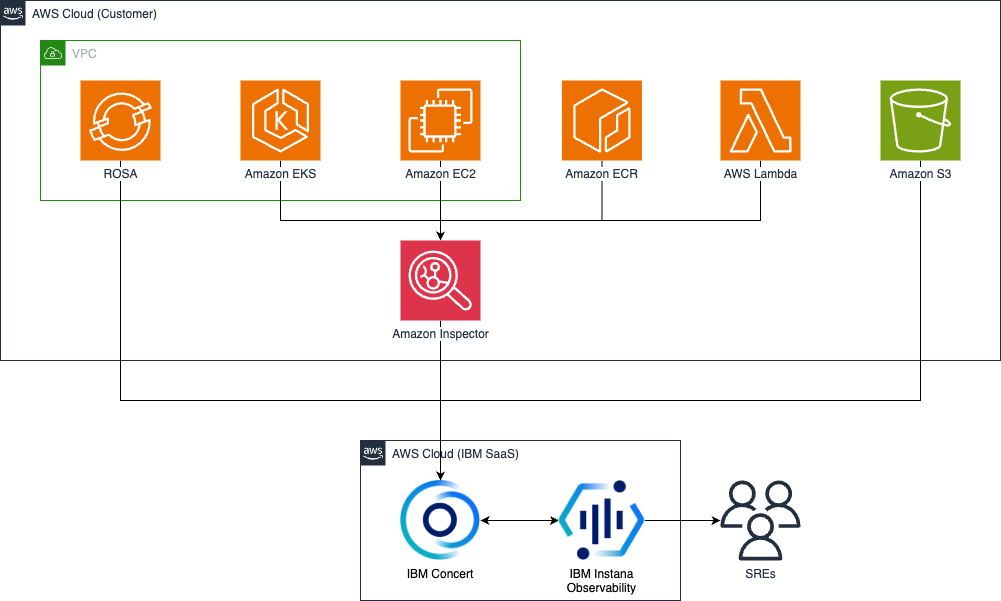
Figure 1. Implementing smarter vulnerability management using Concert, Instana and Amazon Inspector.
- IBM Instana and IBM Concert are SaaS solutions hosted and managed by IBM on AWS.
- ROSA and Amazon Simple Storage Service (Amazon S3) integrate directly with IBM Concert.
- Amazon Inspector scans Amazon EKS, Amazon EC2, Amazon Elastic Container Registry (Amazon ECR), and AWS Lambda functions. It integrates with IBM Concert for issue management.
Security note: Communication between Concert, ROSA, and Instana is TLS encrypted. Concert and Instana encrypt all vulnerability data and application metadata at rest.
Implementation walkthrough
Prerequisites
Ensure that you have the following before you perform the implementation steps:
- An AWS account with credentials configured
- An existing ROSA cluster with applications deployed
- An Instana agent installed and running on a host with access to your environment
- An active subscription to IBM Concert SaaS on AWS Marketplace
- An active subscription to IBM Instana on AWS Marketplace (a free trial is available)
- AWS Identity and Access Management (AWS IAM) permissions for ROSA operations. AWS recommends providing least privilege.
- Access to your Concert tenant URL
- Access to your Instana tenant URL
Cost considerations
If you follow this walkthrough in your own AWS account, you incur charges for any AWS resources that you create. These include ROSA cluster costs, Amazon Inspector scanning costs, Amazon EC2 instances, Amazon Elastic Block Store (Amazon EBS) volumes, Elastic Load Balancing, and Amazon Virtual Private Cloud (Amazon VPC) resources. Your environment might incur additional costs depending on your configuration. Use the AWS Pricing Calculator to estimate your costs before you begin. The cleanup section at the end of this post explains how to remove resources and stop ongoing charges.
Step 1. Configure Concert with ROSA
In this step, you connect IBM Concert to the ROSA environment in your AWS account and discover applications.
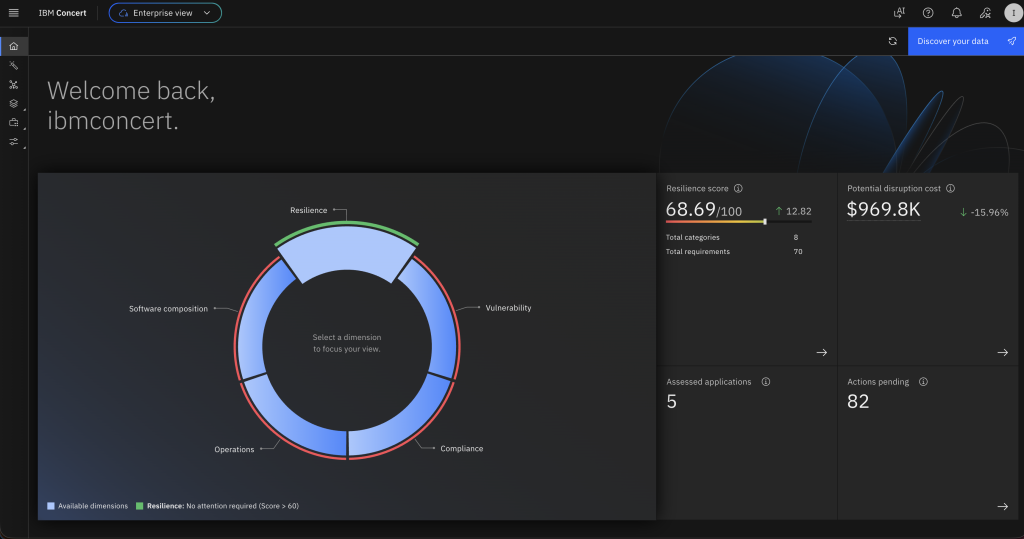
- Log in to the Concert tenant URL. On the home page, choose Discover your data as shown in Figure 2.
- In the Choose the integration section, select Amazon Web Services Red Hat OpenShift Service (AWS ROSA) as shown in Figure 3.
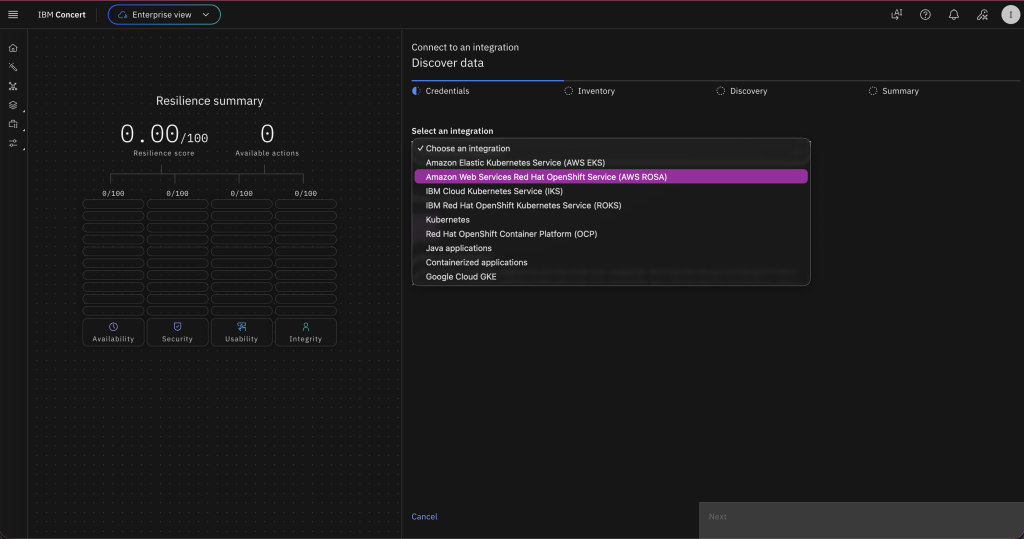
Figure 3. Choose Red Hat OpenShift Service on AWS in the integration section.
- For Endpoint, enter the ROSA cluster endpoint.
- For Token, enter the ROSA cluster token.
- For Cluster name, enter the ROSA cluster name.
- On the Inventory page, select the box next to your AWS environment name to discover all applications as shown in Figure 4.
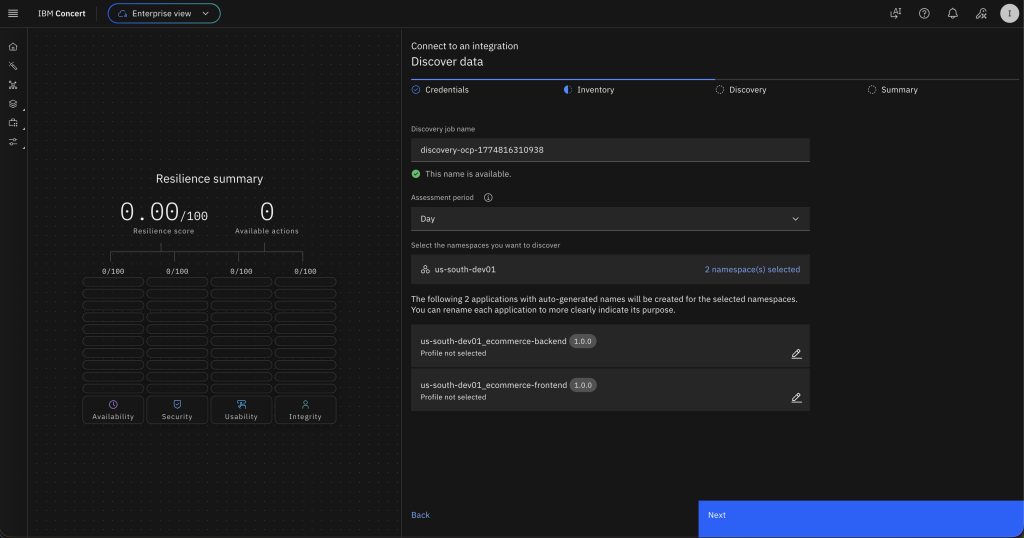
Figure 4. Select applications to discover from the ROSA environment.
- Choose Next. Concert discovers the applications from your ROSA cluster and ingests them. Wait 10–15 minutes for Concert to perform an image scan against the discovered images.
Step 2. Review container image CVEs in Concert
- On the Vulnerability dimension, Concert has created an image scan for all discovered applications as shown in Figure 5.
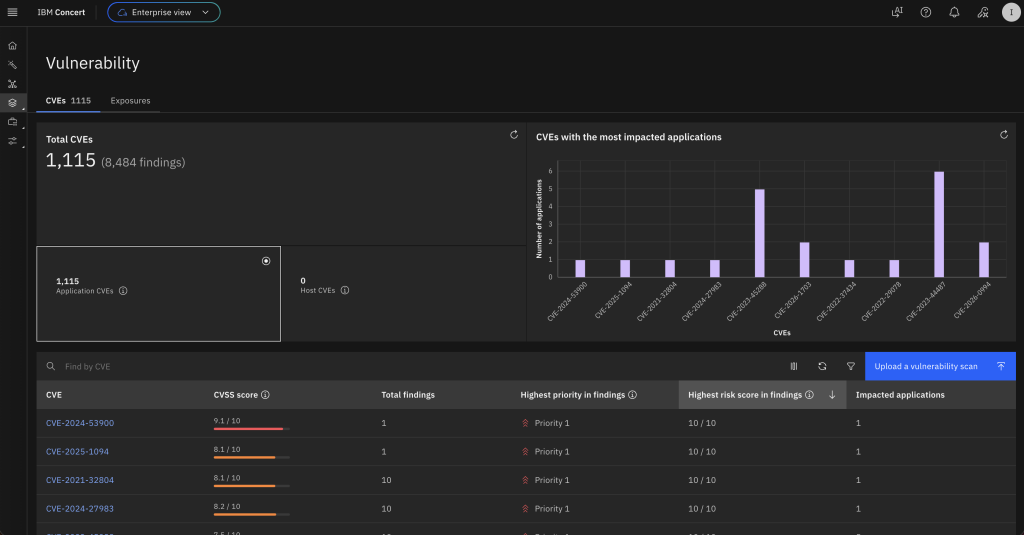
Figure 5. Vulnerability page showing the image scans for all discovered applications.
- In the table with the list of CVEs, select one to review its details as shown in Figure 6.
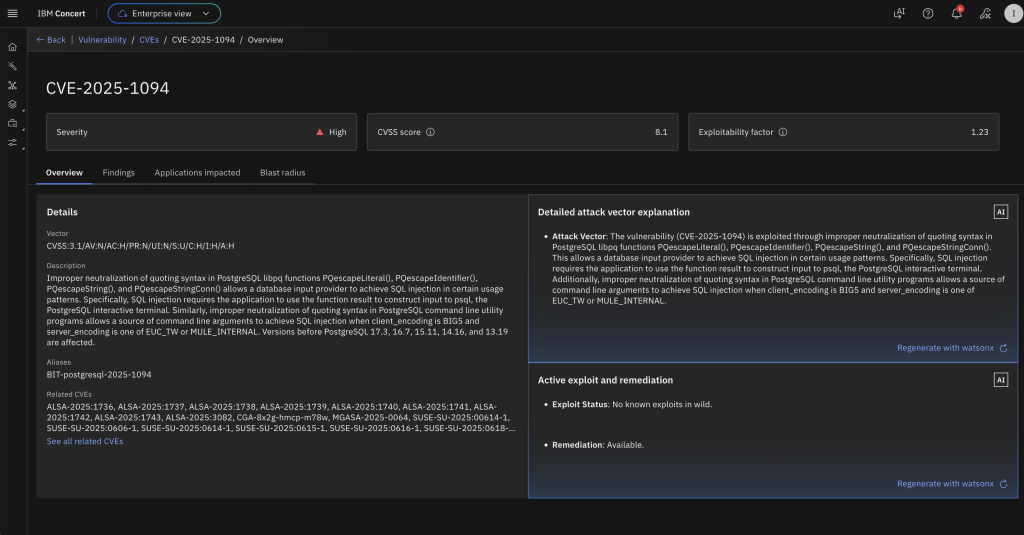
Figure 6. Details for a CVE selected from the list of CVEs identified through the scans.
- Choose the Blast radius tab to see a visual correlation of the CVE with the impacted packages, images, applications, and environments as shown in Figure 7.
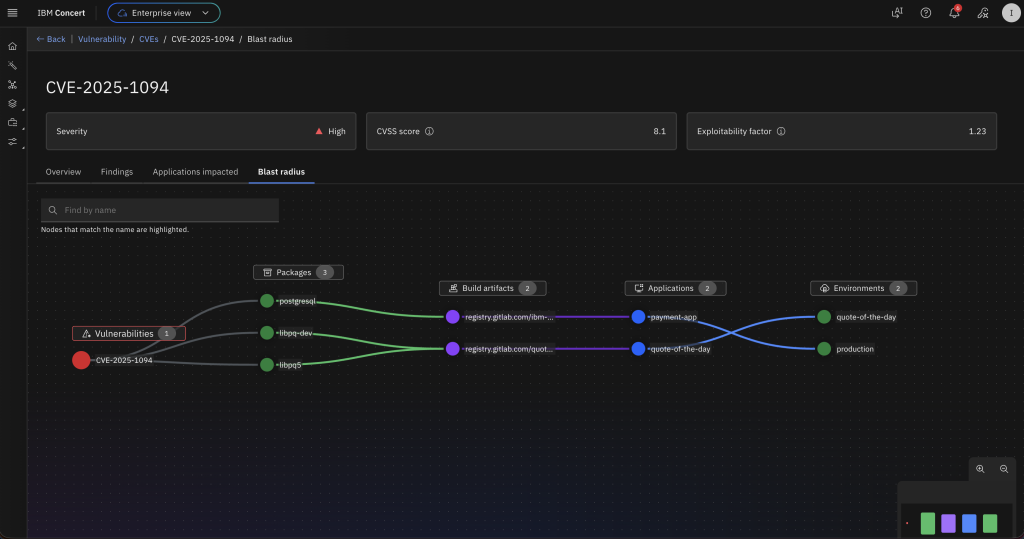
Figure 7. Blast radius tab for the selected CVE showing the packages, container images, applications, and environments.
- Navigate to the Findings In the Total Findings table, notice the different priorities for each finding. Concert prioritizes findings based on a Risk Score. The Risk Score takes into account Severity (based on CVSS), Exploitability (based on EPSS), and an Environmental Factor (derived from application details such as Application Criticality, Data Impact, and Endpoints). The different priorities for the same CVE are due to different environmental factors across the applications as shown in Figure 8.
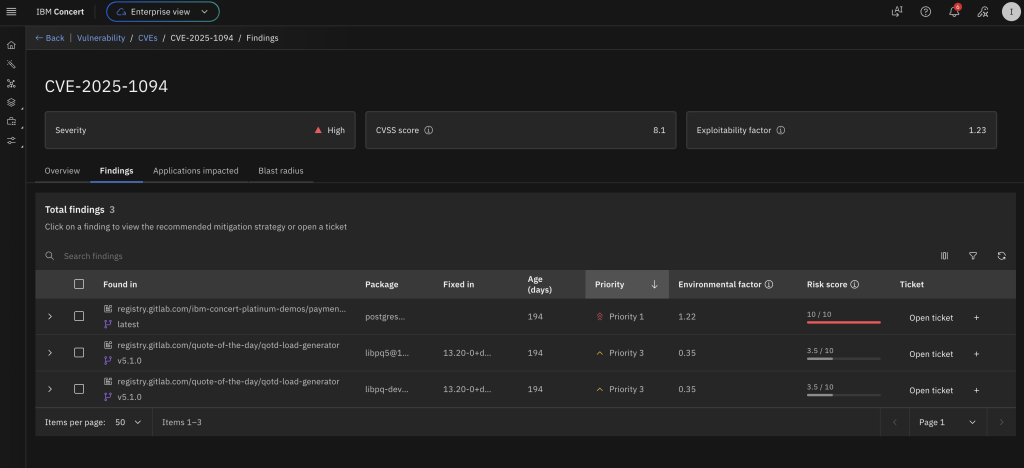
Figure 8. Findings tab showing different priorities for the findings.
- Expand the top finding. Concert provides AI-assisted remediation guidance specific to this finding as shown in Figure 9.
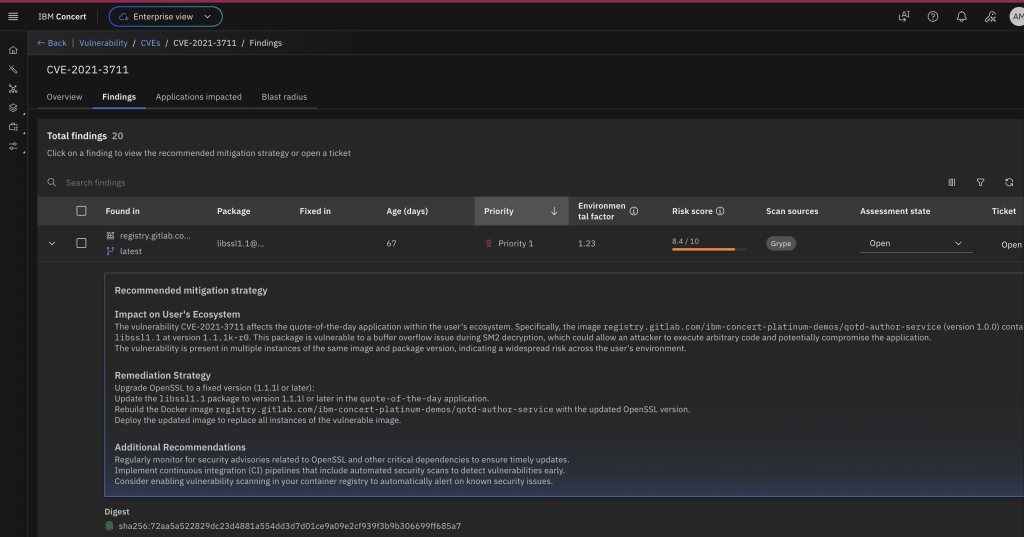
Figure 9. AI-assisted remediation guidance for the findings.
You have successfully integrated ROSA with IBM Concert to identify and act on issues in container images, packages, and applications.
Step 3. Integrate Concert with Instana
Integrating IBM Concert with Instana brings vulnerability insights directly into the observability workflow, giving SREs and application owners a unified, context-rich view of issues. By pulling prioritized CVE data into Instana, teams can review vulnerabilities alongside performance and runtime signals. This removes the need to manually correlate scans, SBOMs, and runtime environments. Instead, it creates an automated flow that surfaces the issues that matter most.
Step 4. Create an Instana connection in Concert
In this section, you use the Concert UI to establish a connection with Instana.
- In the Concert UI, choose Administration.
- Select Integrations.
- Choose the Connections
- Choose Create connection as shown in Figure 10.
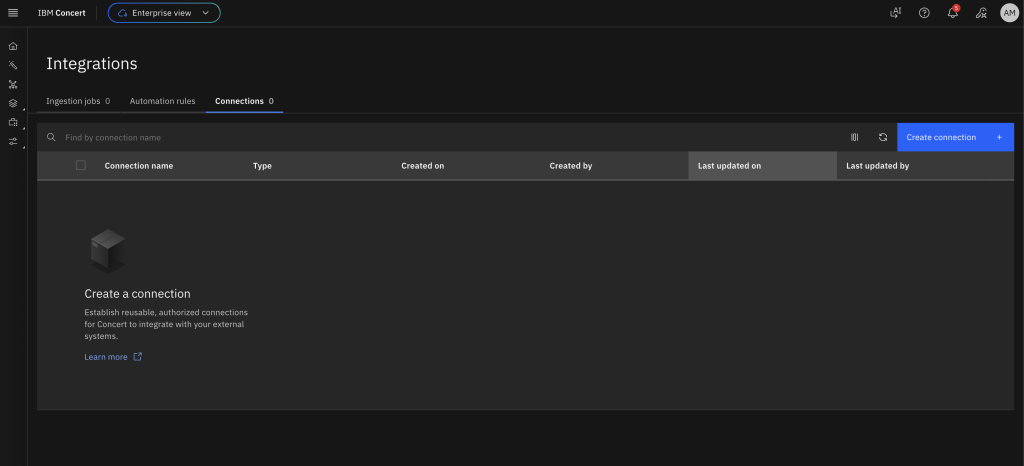
Figure 10. Establish a connection with Instana from the Concert UI.
- Use the search bar to find and select IBM Instana Observability.
- In the Create IBM Instana Observability connection screen, for Name, enter a connection name such as instana-connection.
- For Endpoint, enter the Instana URL.
- For API Key, enter the Instana API Token from your Instana instance.
- Choose Validate connection as shown in Figure 11.
- After the validation completes successfully, choose Create.
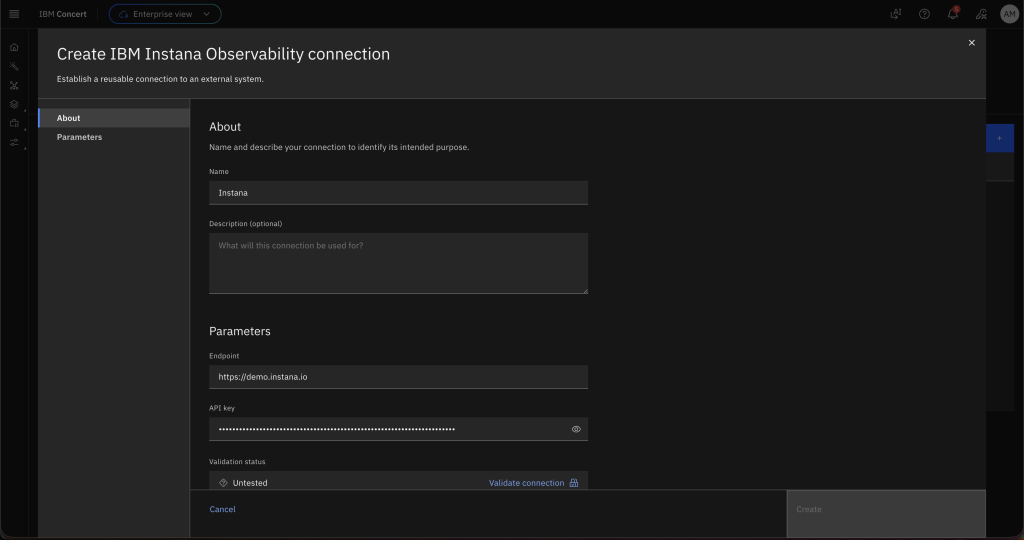
Figure 11. Enter the details for connecting to Instana.
Step 5. Create a data ingestion job in Concert
In this section, you create an ingestion job to pull application and environment data from Instana to Concert.
- In the Concert UI, choose Administration.
- Select Integrations.
- Under the Ingestion jobs tab, choose Create ingestion job.
- For Name, enter instana-ingestion.
- For Connection type, select Instana.
- For Connection, select the name of the connection you established previously.
- Select the staging Target environment discovered previously.
- Choose Create as shown in Figure 12. The new ingestion job appears in the list.
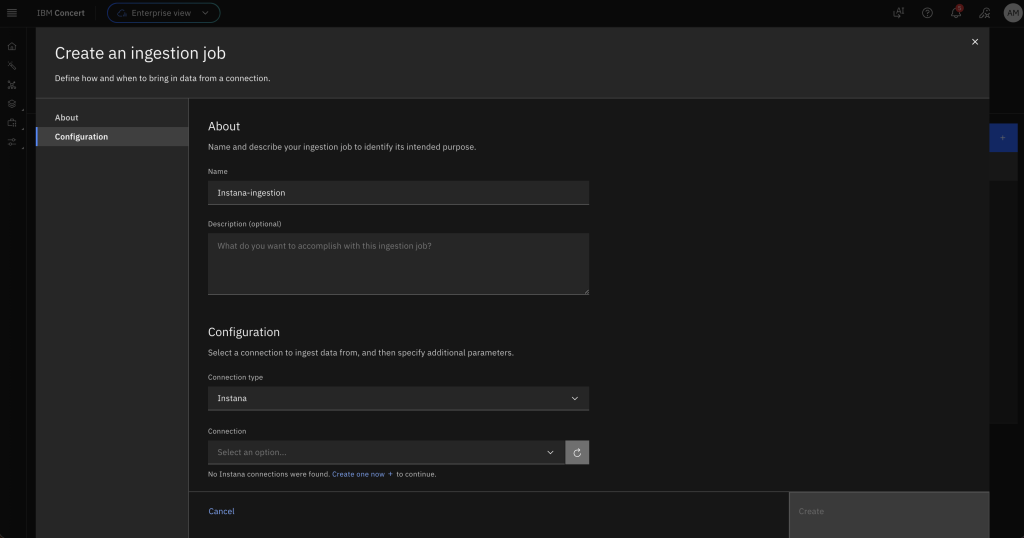
Figure 12. Creating an ingestion job by providing the configuration details.
Step 6. Configure the CVE sensor in Instana
In this section, you establish a connection from Instana to Concert. Instana pulls vulnerability data from Concert using the CVE sensor. You can enable the CVE sensor in the Instana agent running on the Instana host by updating its configuration.
Note: The following tasks (steps 1–6 in this section) have been simplified for demonstration purposes. In a production environment, use AWS Systems Manager Session Manager as the preferred method for accessing Amazon EC2 instances (step 1). Never bypass proper certificate validation procedures (step 3). Minimize sudo commands in favor of least-privilege principles (steps 2–6).
- From your terminal, use SSH to connect to the Instana host, replacing the value below with your user and hostname:
ssh user@hostname- Back up the configuration file before making changes by running the following command:
sudo cp /opt/instana/agent/etc/instana/configuration.yaml /opt/instana/agent/etc/instana/configuration.yaml.backup- Open the configuration file in the vi editor by running the following command:
sudo vi /opt/instana/agent/etc/instana/configuration.yaml- Search for the line that contains
cve. Uncomment theinstana.plugin.cvesection and update it to include the Concert connection details as shown in the following example. Forbase_url, enter the Concert endpoint URL. Forapi_key, enter your Concert API key. For testing purposes, addignore_cert: trueto ignore SSL certificate validation when using a self-signed certificate for Concert. In production environments, implement proper certificate validation.
com.instana.plugin.cve:
  enabled: true
  concert:
    base_url: 'https://<url>:'
    instance_id: '0000-0000-0000-0000'
    api_key: 'Concert API key'
    poll_rate: 1
ignore_cert: true- Restart the Instana agent to apply the updated configuration by running the following command:
sudo systemctl restart instana-agent- Verify the agent status by running the following command. The agent should show as active and running:
sudo systemctl status instana-agent- Verify that the CVE sensor is enabled by checking the agent log file with the following command. The output should contain the line
Activated Sensor for concertCve.
sudo cat /opt/instana/agent/data/log/agent.log | grep -i cveNote: The log output might include errors such as cve_sensor_exception : Invalid base_url. You can safely ignore these if the output also contains the message Activated Sensor for concertCve.
Cleanup
To clean up IBM Concert, navigate to the IBM SaaS console and delete your subscription to IBM Concert.
To delete the Instana free trial, cancel both the subscription and the deployed resources:
- In the AWS Marketplace console, choose Manage subscriptions.
- Find Instana in your subscriptions.
- Choose Cancel subscription.
- Remove any resources that you have running in your AWS account for this walkthrough.
Conclusion and next steps
In this post, you learned how IBM Concert automatically discovers workloads running in a ROSA cluster, performs vulnerability scans on the discovered container images, and surfaces the results in a unified, context-aware view.
By combining Concert’s automated discovery with integrated vulnerability scanning, teams can identify, review, and prioritize security issues based on contextual risk rather than raw severity. Concert’s AI-generated remediation guidance provides clear, actionable steps for each finding, enabling faster vulnerability resolution.
This workflow consolidates vulnerability management across cloud-native environments by reducing noise and helping teams focus on the risks that matter most.
Get started
Ready to get started? Visit the IBM Concert as a Service and subscribe to a 14-day free trial of IBM Instana Observability PayPerUse on AWS Marketplace.
Additional Content:
- Announcing IBM Concert SaaS Availability on AWS Marketplace
- Stream Amazon CloudWatch metrics to IBM Instana with Amazon Data Firehose
- Reducing Network Costs and Enhancing Observability Security with IBM Instana and AWS PrivateLink
- Implement observability for Amazon EKS workloads using the Instana Amazon EKS Add-on
- Monitor and Optimize Amazon EKS Costs with Instana and Kubecost
- Monitoring Amazon Bedrock Large Language Models with Instana
- Automate Observability for AWS with Instana self-hosted
- Realtime monitoring of microservices and cloud-native applications with Instana SaaS on AWS