Artificial Intelligence
Configuring Amazon Bedrock AgentCore Gateway for secure access to private resources
AI agents in production environments often need to reach internal APIs, databases, and private resources that sit behind Amazon Virtual Private Cloud (Amazon VPC) boundaries. Managing private connectivity for each agent-to-tool path adds operational overhead and slows deployment. Amazon Bedrock AgentCore VPC connectivity is designed to deploy AI agents and Model Context Protocol (MCP) servers without requiring the network traffic to be exposed to the public internet. This capability extends to managed Amazon VPC egress for Amazon Bedrock AgentCore Gateway, so you can connect to endpoints inside private networks across your AWS environment.
In this post, you will configure Amazon Bedrock AgentCore Gateway to access private endpoints using Resource Gateway, a managed construct that provisions Elastic Network Interfaces (ENIs) directly inside your Amazon VPC, one per subnet. You will explore two implementation modes (managed and self-managed) and walk through three practical scenarios: connecting to a private Amazon API Gateway endpoint, integrating with a MCP server on Amazon Elastic Kubernetes Service (Amazon EKS), and accessing a private REST API.
Key terms
The following terms are used throughout this post. Review them before proceeding to understand how each component fits into the AgentCore Gateway VPC egress architecture.
Resource VPC: The Amazon VPC where your private resource lives. For example, the VPC containing your privately hosted MCP server or API endpoint. This is the Amazon VPC that AgentCore Gateway needs to reach. Resource VPC can either be in the same AWS account as the AgentCore Gateway account or in a different account.
AgentCore Gateway account: The AWS account where you create and manage your AgentCore Gateway resources. This account may or may not be the same account as the Resource VPC.
Resource Gateway: Resource gateway acts as the private entry point into your Resource VPC. When created, it provisions one ENI per subnet that you specify, each sitting inside your VPC. Traffic from AgentCore Gateway to your private resource arrives through these ENIs.
Resource Configuration: Resource configuration for VPC resources defines the specific resource AgentCore Gateway is allowed to reach through the Resource Gateway, identified by a domain name, or IP address. Rather than granting access to your entire Amazon VPC, a Resource Configuration scopes connectivity to a single endpoint.
Service Network Resource Association: A service network resource association connects a resource configuration to the AgentCore service network, which allows AgentCore Gateway service to invoke your private endpoint. AgentCore creates and manages this association on your behalf, regardless of which mode you use.
How does AgentCore Gateway VPC egress work?
AgentCore Gateway VPC egress supports two modes depending on how much control you want over the underlying networking infrastructure and how you want to architect for cross-VPC connectivity.
Managed VPC resource
In this mode, AgentCore Gateway handles everything on your behalf. You provide your VPC ID, subnet IDs, and security groups as part of your target configuration, and AgentCore automatically creates and manages the VPC Resource Gateway in your account. This mode integrates with existing network architectures, whether you use VPC peering for same-Region or cross-Region connectivity or a hub-and-spoke model with AWS Transit Gateway for multi-VPC and hybrid environments.
The following architecture shows how AgentCore Gateway connects to private Amazon API Gateway using managed VPC resource mode.
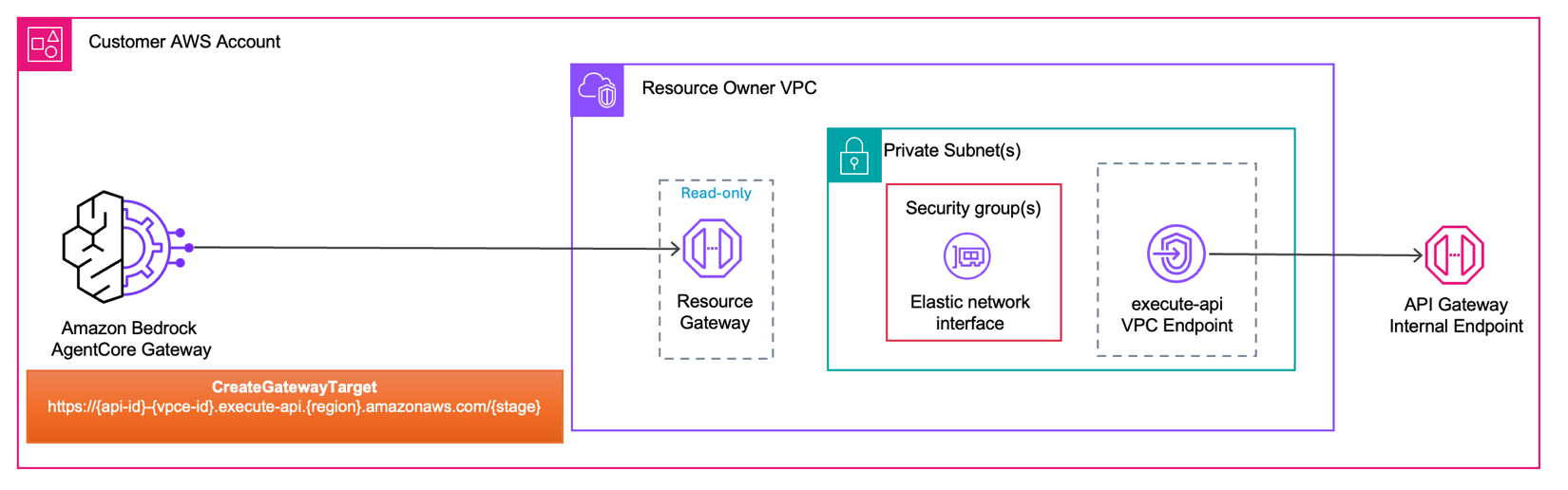
When you create an AgentCore Gateway Target with a managed VPC resource configuration, AgentCore Gateway initiates the request and routes it to the Resource Gateway inside your Resource Owner VPC. The Resource Gateway forwards traffic through an ENI provisioned in your subnet, governed by the security groups you configure. From the ENI, the request reaches the execute-api VPC endpoint. In managed VPC Resource mode, AgentCore creates and manages the Resource Gateway on your behalf, you only have read-only visibility into it.
Self-managed Lattice resource
In this mode, you create and manage the VPC Lattice Resource Gateway and Resource configuration before referencing it during target creation on AgentCore Gateway. This gives you visibility and control over the Resource configuration, including the number of IPv4 addresses per ENI, subnet placement, and security group rules. More importantly, it gives you visibility into the resource configuration itself, with the ability to view it, share it using AWS Resource Access Manager (AWS RAM) (required for cross-account connectivity), see associations tied to it, and retain the ability to revoke those associations when you choose.
The following architecture shows how AgentCore Gateway connects to private Rest API endpoints using self-managed lattice resource mode.
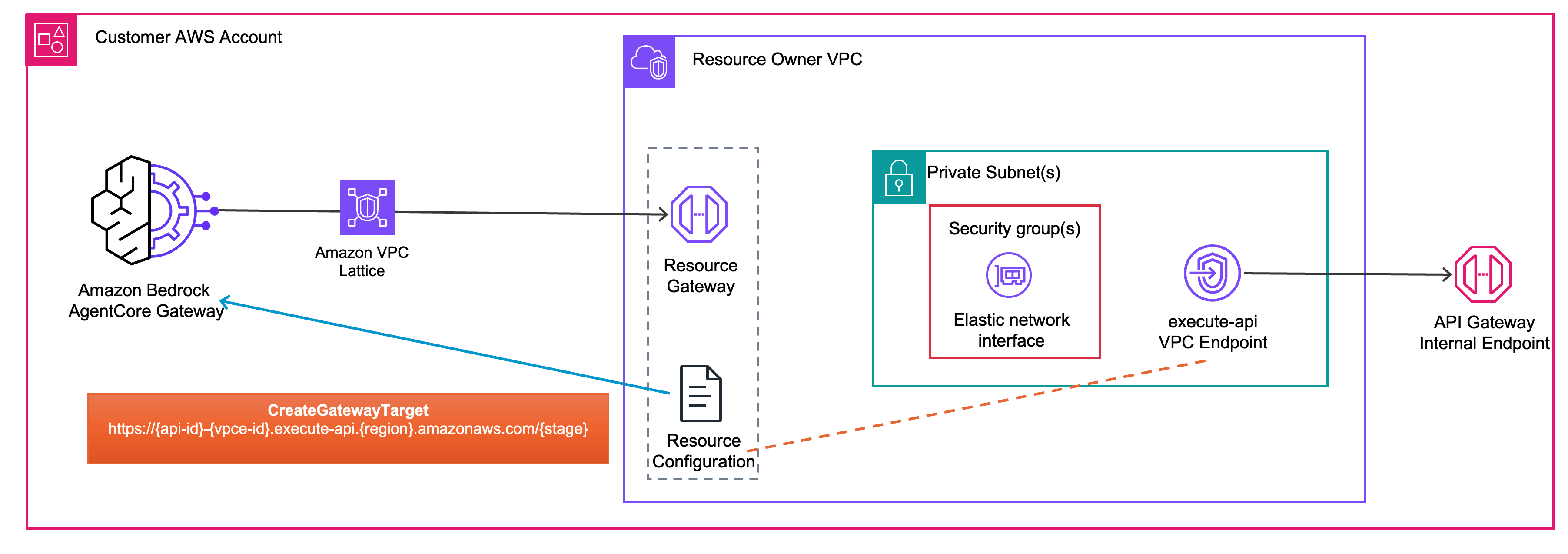
In self-managed lattice resource mode, you pre-create the Resource Gateway and Resource Configuration before configuring your AgentCore Gateway Target. When you call CreateGatewayTarget, you pass the Resource Configuration ID to associate AgentCore Gateway target with your private endpoint. At invocation time, Resource Gateway forwards the request through an ENI provisioned in your subnet, governed by the security groups you configure. From the ENI, the request reaches the execute-api VPC endpoint. Unlike managed VPC Resource mode, you own and manage the Resource Gateway and Resource Configuration.
Use the following table to determine which mode fits your architecture. Choose managed VPC resource mode for streamlined setup, or self-managed Lattice resource mode for control over Resource Gateway lifecycle, cross-account connectivity, and visibility into associations.
| Dimension | AgentCore Managed VPC Resource | Self-Managed Lattice Resource |
| Setup complexity | Straightforward; provide VPC ID, subnet IDs, and security group IDs. AgentCore manages the rest | Advanced; you create and manage the Amazon VPC Lattice Resource Gateway and Resource Configurations yourself, then pass the resource configuration ID to each target |
| IPv4 consumption | Each managed resource gateway consumes 1 IP address per ENI. This is not configurable | When used with Amazon Bedrock AgentCore, it consumes one IP address per subnet. If also attached to other VPC Lattice service networks, it consumes additional IPs based on the ipv4AddressesPerEni value on the resource gateway |
| Cross-account | Not natively supported use hub-and-spoke architectures (VPC peering or AWS Transit Gateway ) for cross-account / cross-VPC scenarios. | Supported with AWS Resource Access Manage (AWS RAM). Enables direct cross-account connectivity without requiring VPC peering or Transit Gateways. |
| Reusing existing ENIs | AgentCore automatically reuses one Resource Gateway (and its ENIs) across targets in the account whose managedVpcResource config matches on Amazon VPC, subnet set, security-group set, tags, and IP address type | You attach multiple Resource Configurations to a single Resource Gateway you own; target whose resourceConfigurationIdentifier resolves to that Resource Gateway shares its ENIs |
| Resource Gateway Lifecycle management | Amazon Bedrock AgentCore creates, reuses, and deletes Resource Gateways on your behalf | You own the full lifecycle of resource gateways and resource configurations |
| Governance and visibility | Resource Configurations are managed in the Amazon Bedrock AgentCore service account and aren’t visible in your Amazon VPC console. The underlying Resource Gateway is visible in your account in read-only mode | Full visibility into Resource Configurations, Service Network associations, and connected domains in your Amazon VPC Lattice console. You can audit connections and revoke access at a granular level |
| Pricing | Per-GB data processing charges only (for data processed through the Resource Gateway) | 1) Hourly charge for Service Network association2) Per-GB data processing charges |
Get started with AgentCore Gateway VPC egress
In this post, you focus on the managed VPC resource mode. If you want to explore the self-managed lattice resource offering, follow the code samples. Before getting started, this post assumes basic familiarity with Amazon VPC, AWS Command Line Interface (AWS CLI), Amazon Bedrock AgentCore, and Amazon Bedrock AgentCore Gateway. Make sure that you have the following in place.
- AWS Command Line Interface (AWS CLI)
- AWS Credentials
- Public Certificate Authority
Currently AgentCore Gateway’s trusts publicly signed TLS certificates; it doesn’t trust certificates signed by a private CA, so the handshake to your backend fails. If your endpoint is protected by a private or self-signed certificate, find the working solution sample on GitHub.
- AWS Identity and Access Management (IAM) permissions
Your IAM principal needs the iam:CreateServiceLinkedRole permission for bedrock-agentcore.amazonaws.com, so that AgentCore can create the service-linked role on your behalf if it does not already exist. For the required IAM policy, see Gateway service-linked role.
- Set up security groups
The Resource Gateway security group controls what traffic the Resource Gateway ENIs can send outbound to resources inside your Amazon VPC. If you don’t provide the security group while invoking CreateGatewayTarget API, then the default security group is used.
- AgentCore Gateway
This walkthrough assumes that you have an existing AgentCore Gateway. If you haven’t created one yet, run:
Note the gatewayId from the response. You need it when creating AgentCore Gateway Targets in the steps that follow.
- For in-depth examples, see the GitHub repository .
Private Amazon API Gateway
In this section, you create an AgentCore Gateway target that routes to a private Amazon API Gateway. Call the CreateGatewayTarget API with the following parameters. In the openApiSchema field, provide your private Amazon API Gateway endpoint URL (https://{api-id}-{vpce-id}.execute-api.{region}.amazonaws.com/{stage}). In the managedVpcResource block, provide your VPC ID, subnet IDs, and security group ID.
After you run the command, AgentCore Gateway uses its service-linked role to provision a Resource Gateway in your VPC, creating one ENI per subnet you specified.
The following architecture diagram shows the network flow.
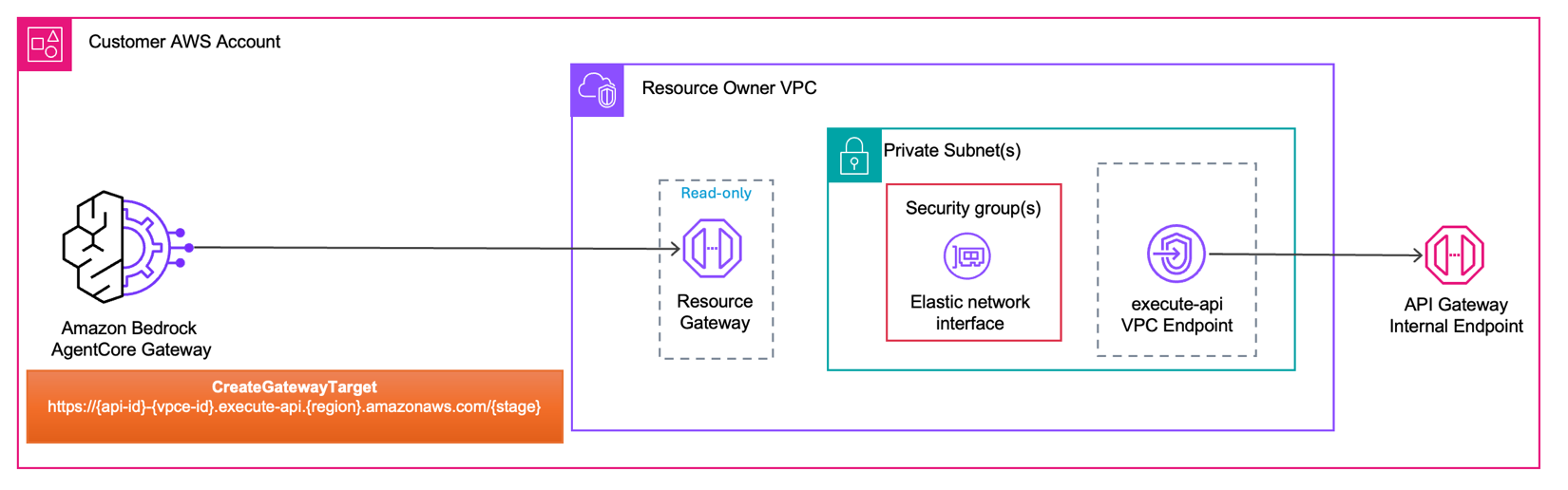
AgentCore Gateway initiates the request and routes it to the Resource Gateway provisioned inside Resource Owner VPC. Traffic passes through the ENI inside your private subnet, where your security group rules govern what reaches the next hop. From there, the request reaches the execute-api VPC endpoint, which provides private connectivity to your Amazon API Gateway internal endpoint. The endpoint URL format https://{api-id}-{vpce-id}.execute-api.{region}.amazonaws.com/{stage} is what you provided in the openApiSchema field of your CreateGatewayTarget call.
Private MCP server on Amazon EKS
In this section, you create an AgentCore Gateway target that routes to a private MCP server running on Amazon EKS. Call the CreateGatewayTarget API with the following parameters. In the mcpServer block, provide your internal MCP server endpoint URL. In the managedVpcResource block, provide your VPC ID, subnet IDs, and security group ID.
After you run this command, AgentCore provisions a Resource Gateway in your VPC, creating one ENI per subnet you specified. The following architecture diagram shows the end-to-end traffic path.
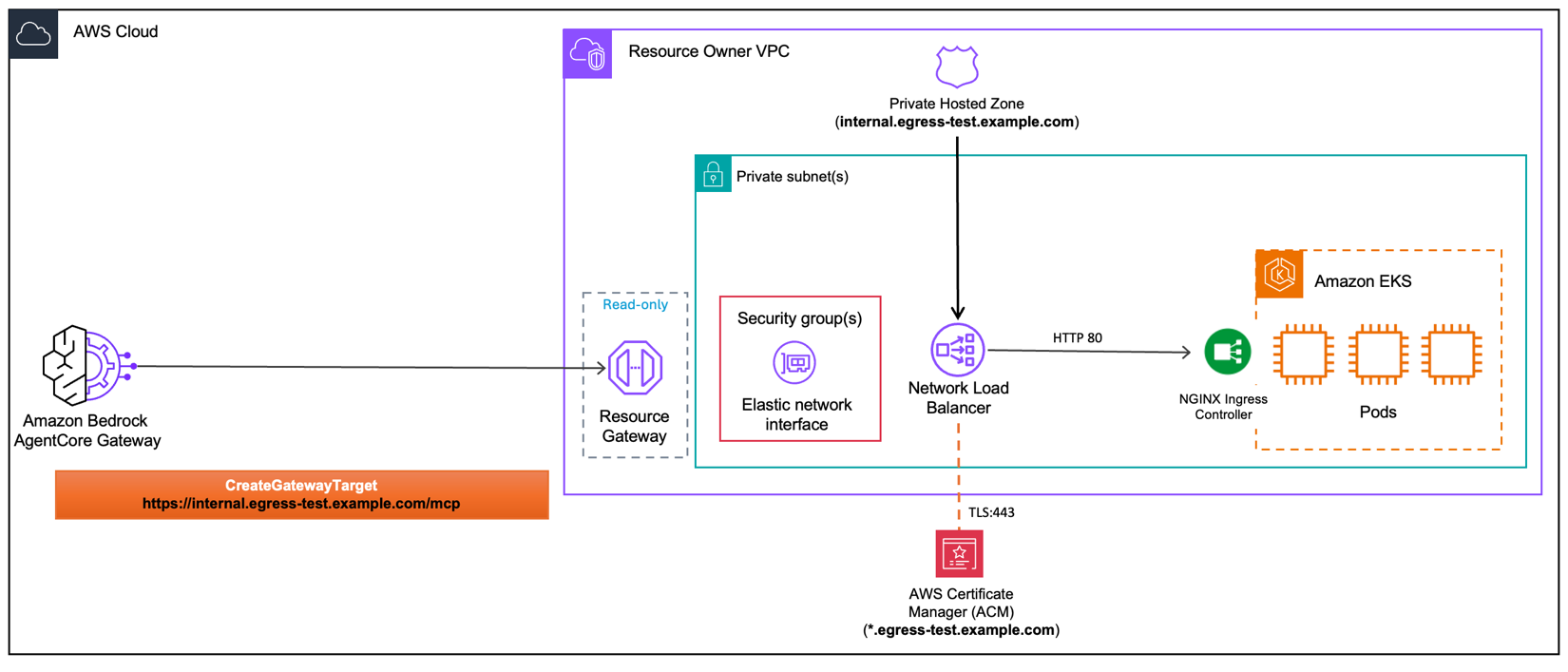
AgentCore Gateway sends an HTTPS request to your internal endpoint. The Amazon Route 53 private hosted zone resolves that domain to the internal Network Load Balancer (NLB). The request enters the Resource Owner VPC through the Resource Gateway, passes through the ENI governed by your security groups, and arrives at the NLB. The NLB terminates TLS on port 443 using an AWS Certificate Manager (ACM) public certificate, then forwards the request over HTTP on port 80 to the NGINX Ingress Controller running on Amazon EKS, which routes it to the appropriate pod.
Private REST API target
In this section, you create an AgentCore Gateway target that routes to a private REST API endpoint. This applies to any REST API running inside your Amazon VPC such as a containerized microservice. The CreateGatewayTarget API call follows the same pattern as the previous sections. In the openApiSchema field, provide your OpenAPI schema describing the REST API. In the managedVpcResource block, provide your VPC ID, subnet IDs, and security group ID. After AgentCore Gateway provisions the Resource Gateway in your VPC, the following architecture diagram shows the end-to-end traffic path.
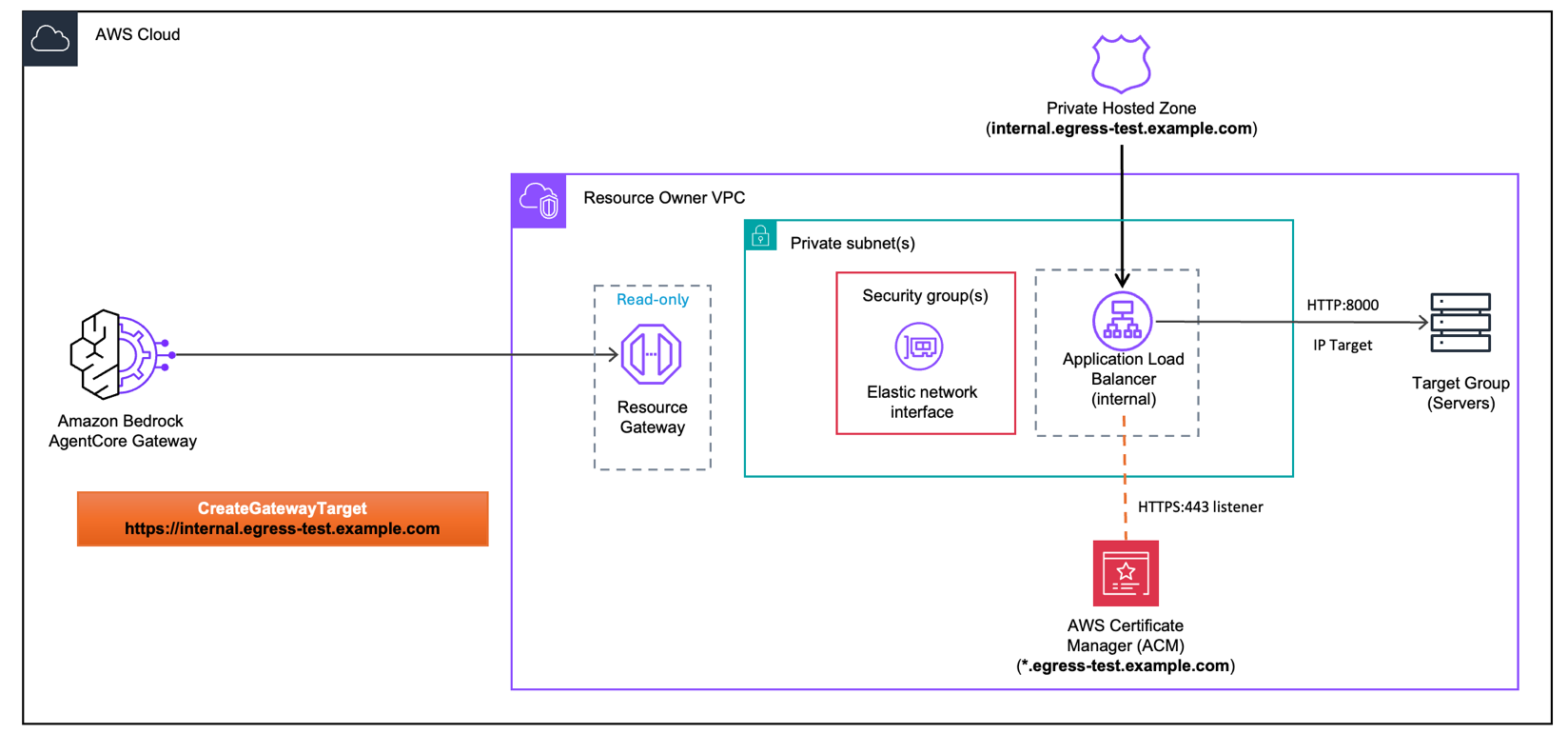
AgentCore Gateway sends an HTTPS request to your internal endpoint. The Amazon Route 53 private hosted zone resolves that domain to the internal Application Load Balancer (ALB). The request enters the Resource Owner VPC through the Resource Gateway, passes through the ENI governed by your security groups, and arrives at the internal ALB. The ALB terminates TLS on port 443 using an AWS Certificate Manager (ACM) public certificate, then forwards the request over HTTP on port 8000 to the target group containing your backend servers.
Clean up
To avoid ongoing charges, delete all resources created in this walkthrough. For reference, see the AgentCore Gateway VPC egress pricing page. Additionally, Amazon EKS clusters, load balancers, and API Gateway endpoints incur charges while running. Verify that your resources are deleted to stop charges. If you followed the GitHub sample, make sure to run the cleanup section at the end of each Jupyter Notebook.
If you used managed VPC resource mode, deleting the Gateway Target removes the associated Amazon VPC Resource Gateway.
Conclusion
As AI agents take on more complex tasks, they need secure access to the tools and services that power your business, many of which live inside private networks. AgentCore Gateway VPC egress allows your agents to reach private MCP servers, internal APIs, databases, and on-premises systems without exposing them to the public internet.Managed VPC resource mode integrates directly with your existing VPC and requires minimal configuration. Self-managed lattice resource mode gives you fine-grained control but requires additional setup. Both route traffic through a Resource Gateway that doesn’t leave the AWS network.
Next steps
- Identify one internal API or MCP server in your environment that would benefit from AI agent access
- Review your existing Amazon VPC architecture to determine which mode (Managed VPC Resource or Self-Managed Lattice Resource) fits your requirements
- Review the Amazon Bedrock AgentCore Gateway documentation for additional configuration options
- Explore the Amazon VPC Lattice Resource Gateway documentation for cross-account scenarios
- Explore additional integration patterns and advanced configurations, see GitHub samples.
About the authors
 Eashan Kaushik is a Specialist Solutions Architect AI/ML at Amazon Web Services. He is driven by creating cutting-edge generative AI solutions while prioritizing a customer-centric approach to his work. Before this role, he obtained an MS in Computer Science from NYU Tandon School of Engineering. Outside of work, he enjoys sports, lifting, and running marathons.
 Thomas Mathew Veppumthara is a Sr. Software Engineer at Amazon Web Services (AWS) with Amazon Bedrock AgentCore. He has previous generative AI leadership experience in Amazon Bedrock Agents and nearly a decade of distributed systems expertise across Amazon eCommerce Services and Amazon Elastic Block Store (Amazon EBS). He holds multiple patents in distributed systems, storage, and generative AI technologies.
Rohin Meduri is a Software Engineer at Amazon Web Services (AWS) with Amazon Bedrock AgentCore. He has previous AI development experience with Amazon Bedrock Agents and Amazon Lex. Before this role, he obtained a BS in Computer Science from the University of Washington. Outside of work, he enjoys chess, pool, and music production.