IBM & Red Hat on AWS
Run watsonx.data integration pipelines close to your data on AWS
Enterprise data teams build pipelines across Amazon Simple Storage Service (Amazon S3) and Amazon Relational Database Service (Amazon RDS), on-premises databases, and hybrid environments. They want to process data close to where it lives so they can reduce data movement, lower transfer costs, and meet data residency requirements. But when infrastructure changes, these teams end up rebuilding pipelines instead of delivering insights. They need to design a pipeline once and run it wherever their data lives, without maintaining a separate version for each location.
IBM watsonx.data integration, available on AWS Marketplace, addresses this challenge with a decoupled architecture. A cloud-based control plane handles pipeline design, scheduling, and monitoring. A remote engine, deployed inside your AWS account, runs the pipeline close to your data. The same pipeline definition works wherever a remote engine is deployed, whether across AWS Regions, on-premises, or in hybrid environments.
In this post, you learn how watsonx.data integration separates pipeline design from pipeline execution, how remote engines keep data processing local, and how this architecture supports portability without rebuilding
How watsonx.data integration works on AWS
IBM watsonx.data integration brings together capabilities for moving and preparing data across multiple integration styles. These include batch processing (ETL/ELT), real-time streaming, and data observability. You can build pipelines on a visual low-code canvas or with a Python SDK, which supports self-service pipeline creation for teams that want to reduce reliance on engineering for routine workflows.
The product is built on a decoupled architecture, with a cloud-based control plane and a hybrid data plane. The control plane is where you design, manage, and monitor pipelines. It holds your pipeline definitions, job schedules, connections, and monitoring views. IBM manages the control plane, so you don’t take on the work of upgrading or maintaining the design and management layer. The data plane is where pipelines run, powered by remote engines that you deploy close to your data. This separation means you get the benefits of local data processing while IBM handles the platform.
Remote engines and the data plane
Remote engines are containerized runtimes that you deploy close to your data, whether on AWS, on-premises, or across multiple environments. On AWS, you can deploy remote engines as containers using Docker or Podman on Amazon Elastic Compute Cloud (Amazon EC2) for straightforward deployments. For workloads that benefit from automated scaling, orchestration, and higher resilience, you can deploy on Amazon Elastic Kubernetes Service (Amazon EKS) or Red Hat OpenShift Service on AWS (ROSA).
Once a remote engine is running, it connects outbound to the control plane and polls for pipeline jobs. All communication is initiated by the remote engine, so no inbound connections to your environment are required. When a job is ready, the engine pulls the pipeline definition from the control plane and runs it locally. The code moves to the data, not the data to the code.
This separation is what makes pipelines portable. Because the pipeline definition describes what to do rather than where to run, the same pipeline can execute against an Amazon S3 bucket in one AWS Region today and a different Amazon S3 bucket, an on-premises IBM Db2 database, or a source in another environment tomorrow. When your data moves or a new source comes online, you can deploy a remote engine in that location and point the same pipeline at it. The engine handles the local connections, credentials, and execution, while the pipeline definition itself stays unchanged.
Connection credentials are stored locally on the remote engine and stay within the environment where the engine runs. The engine processes data in that same environment and writes directly to the target. Only metadata returns to the control plane, including run status, duration, row counts, stage-level metrics, and job logs (optional). This gives you control over where pipeline data is processed, which helps you meet data residency, regulatory, and internal governance requirements, whether the engine runs in your AWS account, in an on-premises environment, or across both.
Example: Amazon S3 to Amazon Redshift or Amazon RDS for Db2
Suppose you have raw data landing in Amazon S3 and you want it cleaned, transformed, and loaded into a target such as Amazon Redshift or Amazon RDS for Db2. The source, the target, and your watsonx.data integration remote engine are all in the same AWS Region. The remote engine runs in an Amazon Virtual Private Cloud (Amazon VPC) in your AWS account.
You design the pipeline once in the watsonx.data integration canvas: read from Amazon S3, apply your transformations, and write to your target. Connection credentials for the source and target are stored locally on the remote engine, so they stay within your environment.
When you deploy the remote engine for the first time, it authenticates with IBM Identity & Access Management services for watsonx.data integration (1), pulls its container images from the IBM container registry (2), and registers with the control plane (3). From that point, the engine is ready to run pipeline jobs.
When you run the job, the remote engine polls the control plane using its bearer token (4), picks up the job parameters and environment variables (5), and begins execution using the pipeline code already compiled to local storage. The engine opens a direct connection to Amazon S3 using the locally stored credentials, reads the source data, and applies the transformations (6). Data remains within your AWS account throughout execution. When processing completes, the engine writes directly to the target using the same local credential model (7).
The following diagram shows how the watsonx.data integration control plane, the remote engine, Amazon S3, and your target service (Amazon Redshift or Amazon RDS for Db2) interact during startup and during a job run.
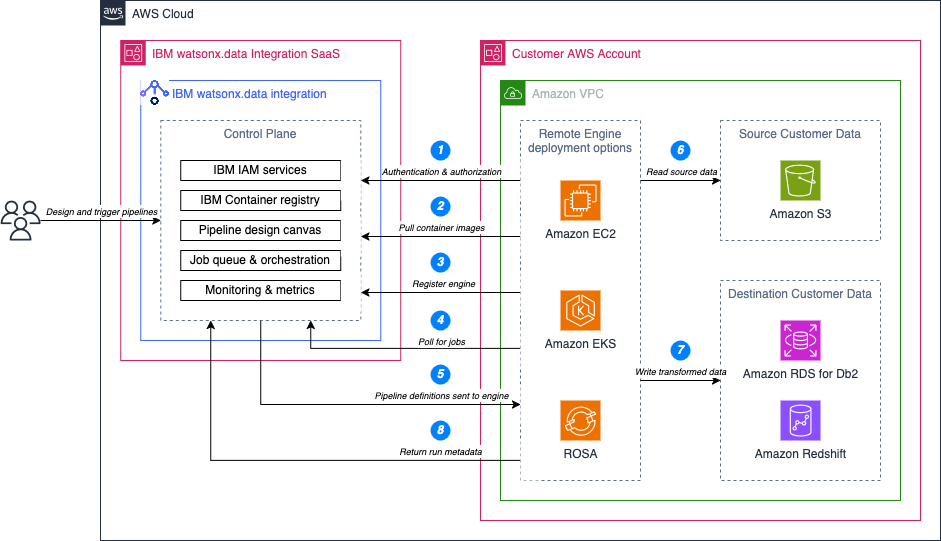
Figure 1. The watsonx.data integration control plane sends the pipeline definition to a remote engine in your AWS account.
When the job finishes, the engine sends metadata back to the control plane (8), including run status, duration, row counts, and stage-level metrics. The monitoring view is built entirely from that metadata, so you get full pipeline observability without the control plane having visibility into the data that was processed.
The pipeline is portable by design. If you later need to run the same pipeline against a different Amazon S3 bucket in another AWS Region, or point it at an on-premises source, you deploy a remote engine there and run it. The pipeline definition doesn’t change.
Conclusion
Pipelines break when they’re tied to a specific environment. By separating the control plane from the data plane, watsonx.data integration gives you the ability to design once and run wherever your data lives, whether that’s an Amazon S3 bucket in the US East (N. Virginia) Region, an on-premises database, or both. When your infrastructure changes, you deploy a remote engine and run the same pipeline.
To get started, visit the IBM watsonx.data integration as a Service listing on AWS Marketplace. To learn more about deploying remote engines, see the IBM watsonx.data integration documentation.
AWS Marketplace:
- IBM watsonx.data integration as a Service
- IBM watsonx.data intelligence as a Service
- IBM watsonx.data PayGo
- IBM watsonx Orchestrate as a Service
- IBM watsonx.governance as a Service
- IBM watsonx.ai Software
Additional Content: