AWS Database Blog
Pagination patterns in Amazon Aurora DSQL
Pagination patterns in Amazon Aurora DSQL control how fast your pages load, how much you spend, and how reliably your transactions complete. Without the right pattern, your application slows down as you page deeper into results, your serverless bill grows with each wasted query, and your transactions fail more often under concurrency pressure.
In this post, you learn three pagination techniques for Aurora DSQL: OFFSET/LIMIT, cursor-based (keyset), and temporal. You implement keyset pagination in SQL and Python, build it into an API layer, optimize with composite indexes, handle batch processing within the 3,000-row transaction limit, and avoid five common anti-patterns. By the end, you can choose the right pagination method for your workload and implement it with confidence.
Aurora DSQL is a serverless, distributed SQL database designed for resilience at every scale. It can span multiple Availability Zones within an AWS Region, or span multiple Regions for workloads that require the highest levels of availability. Aurora DSQL meters all request-based activity (query processing, reads, and writes) using a single normalized unit called a Distributed Processing Unit (DPU). Inefficient pagination means more DPUs consumed and a higher bill.
Solution overview
In Aurora DSQL, when a query scans a large result set only to discard most rows, you consume DPUs that produce no useful results. Pagination limits each request to the data you actually need, reducing both latency and cost. The following diagram shows how different pagination patterns work in Aurora DSQL.
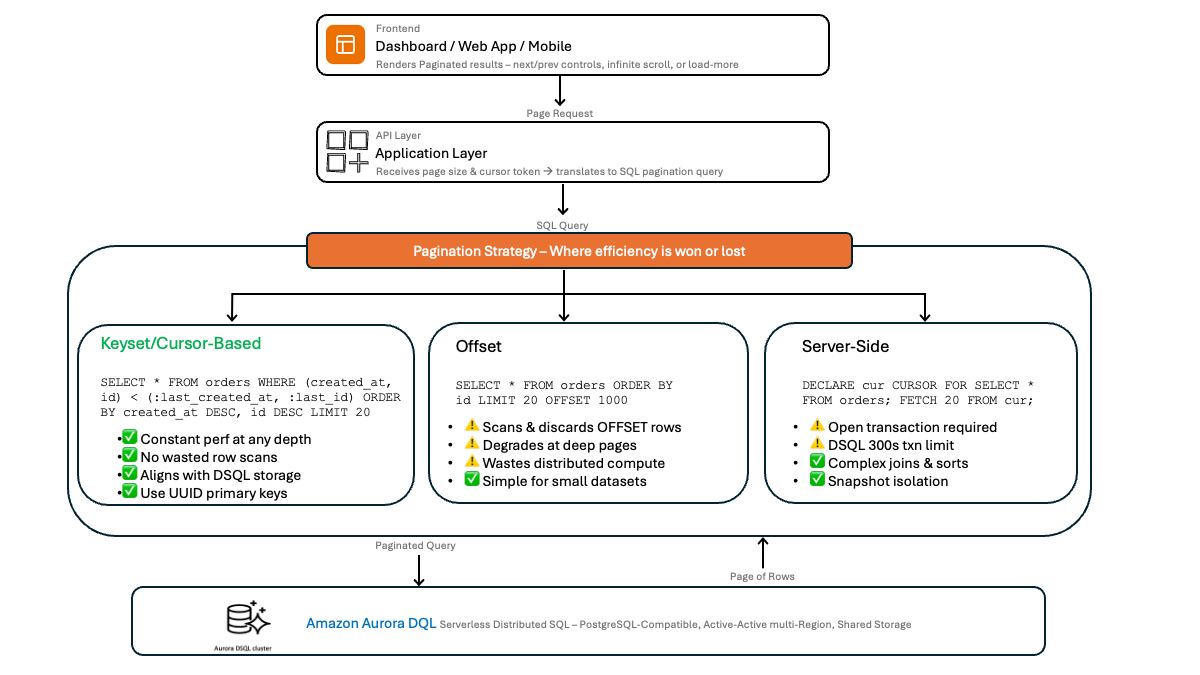
Aurora DSQL characteristics that influence pagination design
The following Aurora DSQL characteristics affect how you design pagination:
- Optimistic concurrency control (OCC) – With the lock-free architecture of Aurora DSQL, your transactions don’t block each other during execution. The system evaluates conflicts at commit time, so long-running transactions increase the window for conflicts.
- Transaction row limit – A single transaction can modify up to 3,000 rows (
INSERT,UPDATE,DELETE). If a single transaction exceeds 3,000 modified rows, it fails, which causes batch processing to fail. - Asynchronous DDL – You can create indexes without blocking reads or writes. Data definition language (DDL) operations like
CREATE INDEX ASYNCrun in the background, so your table remains fully available during index builds. - Serverless billing – You pay per request, and poorly optimized queries increase your costs.
- Repeatable Read isolation – The transaction isolation level uses PostgreSQL Repeatable Read.
- No
TRUNCATEsupport – UseDELETE FROM table_name(in batches for large tables) orDROP TABLEfollowed byCREATE TABLEinstead.
Prerequisites
AWS account requirements
- An active AWS account with permissions to create and manage Aurora resources.
- An Aurora DSQL cluster already provisioned and configured.
Required permissions and IAM roles
- AWS Identity and Access Management (IAM) permissions for Aurora DSQL cluster access.
- A database user with appropriate
SELECTprivileges.
Tools and software
- A SQL client compatible with Aurora (such as DBeaver or pgAdmin).
- A programming language or framework of your choice. Examples in this post use Python.
Solution walkthrough
The following steps walk you through each pagination approach, from basic OFFSET/LIMIT to cursor-based patterns, with code examples and optimization strategies.
Step 1: Understanding pagination options in Aurora DSQL
In a traditional single-node PostgreSQL database, pagination works well for small datasets. You add LIMIT and OFFSET to a query, and it performs adequately for moderate data volumes. But in a distributed database like Aurora DSQL, the performance implications are more significant. Choosing the right pagination pattern affects your performance, your costs, and your application’s reliability.
The three main approaches are:
- Traditional OFFSET/LIMIT: straightforward, but performance decreases with deeper pages.
- Keyset pagination, also called cursor-based pagination: recommended for large datasets and APIs.
- Temporal-based pagination: suited for time-series data (covered later in this post using timestamp-based keyset cursors).
Pattern 1: LIMIT/OFFSET pagination
OFFSET/LIMIT is a common pagination pattern in PostgreSQL, and Aurora DSQL fully supports it.
The following queries show how to paginate through an orders table, retrieving 20 records per page:
When to use it
- Small to medium datasets (tens of thousands of rows).
- Admin dashboards where you need to jump to arbitrary page numbers.
- Prototyping and early development where simplicity matters most.
Trade-offs in Aurora DSQL
OFFSET pagination has a known trade-off: the database must scan and discard every row up to the offset before returning results. On page 1,000 with 20 rows per page, the database processes 20,000 rows to return 20. In the distributed architecture of Aurora DSQL, this cost grows in a serverless, pay-per-use model.
Recommendation: Use LIMIT/OFFSET when your total result set is small or when users rarely paginate beyond the first few pages. Set a maximum page depth to prevent runaway costs.
Step 2: Implementing cursor-based pagination
With keyset pagination, you use the values from the last row of the current page to fetch the next page. You tell the database “give me rows after this specific point” using the last row’s values as a cursor.
Schema design considerations
For keyset pagination to work correctly, your sort order must be deterministic. If created_at has duplicate values, you need a tiebreaker, typically the primary key. Improve write distribution and reduce OCC contention by using random primary keys (such as UUIDs) to spread writes across the cluster.
Why this is the recommended pattern for Aurora DSQL
- Your query performs the same from page 1 to page 10,000, because the database uses an index seek to jump to the starting point.
- Indexes provide consistent query performance through fast range scans on ordered columns.
- Lower conflict potential. Keyset queries are fast and touch fewer rows, reducing the window for OCC conflicts.
- Lower cost. Because the database processes and reads less data per query, your per-request DPU cost drops.
Creating supporting indexes
Aurora DSQL runs index creation asynchronously with CREATE INDEX ASYNC, so your table remains fully available for reads and writes during index builds. You can monitor index creation status using the sys.jobs system view.
Step 3: Building pagination into your API layer
Your application encodes the cursor as an opaque token for use in RESTful API responses.
The following code shows how to encode and decode cursors, and implement a paginated API endpoint:
This code fetches page_size + 1 rows to determine if a next page exists without running a separate COUNT(*) query. execute_query() and execute() represent your database connection method (for example, using psycopg2 or your preferred PostgreSQL driver).
Error handling and edge cases
- Handle expired or invalid cursors gracefully by returning the first page.
- Validate cursor tokens before decoding to prevent injection attacks.
- Return consistent error responses when page size limits are exceeded.
Step 4: Optimizing pagination performance
Index optimization
The Aurora DSQL PostgreSQL-compatible query planner can use composite indexes to serve filtered pagination queries, scanning only the relevant subset of data.
In the following example, we create an index and demonstrate how it optimizes filtered pagination queries:
Note: You can use CREATE INDEX ASYNC in Aurora DSQL with standard index options including composite columns. Sort direction (ASC/DESC) in index definitions isn’t currently supported. NULLS FIRST/LAST works.
Additional optimization strategies
- Use application-level caching (such as Amazon ElastiCache) to reduce repeated database hits for stable datasets.
- Configure connection pooling to manage concurrent pagination requests with lower overhead.
- Use
BEGIN READ ONLYtransactions for read-only pagination to signal that no write conflicts are possible.
Step 5: Handling complex sorting and filtering
Multi-column cursor implementation
For tables with UUID primary keys, pair a sortable column (like a timestamp) with the UUID as a tiebreaker:
Maintaining sort stability with non-unique columns
Include a unique column (such as the primary key) as a tiebreaker in your ORDER BY clause to guarantee stable pagination across pages.
Complex multi-column cursor example
Step 6: Batch processing with keyset iteration
For background jobs that need to process every row in a table (data migrations, exports, or analytics aggregation), keyset pagination is essential. OFFSET-based iteration over millions of rows would be prohibitively slow and expensive.
Aurora DSQL considerations for batch processing
- Respect the 3,000-row transaction limit. Keep
batch_sizewell under 3,000 for write operations. - Keep transactions short. Process each batch in its own transaction rather than wrapping the entire iteration in one.
- Implement retry logic. If a batch encounters an OCC conflict (a serialization error), retry that specific batch. Design your batch operations to be idempotent so retries are safe.
- Use
READ ONLYtransactions for read-only batch operations. This reduces locking overhead and allows Aurora DSQL to optimize query execution for better performance.
Testing and validation
- Validate consistency across page boundaries by verifying no rows are skipped or duplicated between pages.
- Compare pagination methods with large datasets using
EXPLAIN ANALYZEand Amazon CloudWatch metrics to measure query execution times. - Load test both OFFSET and keyset approaches to confirm performance characteristics at scale.
Anti-patterns to avoid
1. COUNT(*) for total pages
Counting every matching row requires a full scan. In a distributed database, this is expensive. Instead, use the “fetch N+1” technique to determine if more pages exist, and avoid displaying exact total counts.
2. Deep OFFSET pagination
If users can jump to page 25,000 in your application, switch to keyset pagination or limit the maximum accessible page depth.
3. Long-lived pagination transactions
Each page fetch should be an independent, short-lived transaction. Aurora DSQL’s OCC model evaluates conflicts at commit time. Long-running transactions increase the chance of conflicts and retries. Database connections also time out after 1 hour.
4. Paginating without a deterministic sort order
Include a unique column (such as the primary key) as a tiebreaker in your ORDER BY clause.
5. Exceeding the transaction row limit in batch writes
Aurora DSQL limits each transaction to modifying a maximum of 3,000 rows. Use keyset-based batch iteration with batch sizes well under 3,000, committing each batch in its own transaction.
Clean up
Delete the following resources to prevent incurring charges.
Resources to delete
- Test tables and indexes created for pagination examples.
- Test data generated for demonstrations.
Commands to run
Conclusion
In this post, you learned how pagination in Aurora DSQL follows the same principles as distributed databases in general: minimize the work per query, keep transactions short, and use indexes effectively. The keyset pagination pattern works well for most use cases. It delivers consistent performance at every pagination depth, aligns with the Aurora DSQL OCC model, and keeps per-request DPU costs predictable as your data grows.
To get started, audit your existing OFFSET/LIMIT queries, identify your highest-traffic endpoints as candidates for keyset pagination, and monitor query latency and OCC conflict rates in Amazon CloudWatch to measure improvement. For more details, see the Amazon Aurora DSQL User Guide, Amazon Aurora DSQL pricing, and Optimistic concurrency control in Aurora DSQL.