AWS Database Blog
Category: Announcements
Working with identity columns and sequences in Aurora DSQL
Amazon Aurora DSQL now supports PostgreSQL-compatible identity columns and sequence objects, so developers can generate unique integer identifiers with configurable performance characteristics optimized for distributed workloads. In distributed database environments, generating unique, sequential identifiers is a fundamental challenge: coordinating across multiple nodes creates performance bottlenecks, especially under high concurrency workloads. In this post, we show you how to create and manage identity columns for auto-incrementing IDs, selecting between identity columns and standalone sequence objects, and improving cache settings while choosing between UUIDs and integer sequences for your workload requirements.
Turbocharge your applications with Amazon DocumentDB 8.0
Amazon DocumentDB 8.0 brings in support for MongoDB 8.0 API driver compatibility while maintaining support for applications built using MongoDB API versions 6.0 and 7.0. This post explores the new features in Amazon DocumentDB 8.0 and demonstrates how they improve performance and cost efficiency.
Use default encryption at rest for new Amazon Aurora clusters
In this post, you learn how Amazon Aurora now provides encryption at rest by default for all new database clusters using AWS owned keys. You’ll see how to verify encryption status using the new StorageEncryptionType field, understand the impact on new and existing clusters, and explore migration options for unencrypted databases.
New in Terraform: Manage global secondary index drift in Amazon DynamoDB
The new aws_dynamodb_global_secondary_index resource treats each GSI as an independent resource with its own lifecycle management. You can use this feature to make capacity adjustments for GSI and tables outside of Terraform. In this post, I demonstrate how to use Terraform’s new aws_dynamodb_global_secondary_index resource to manage GSI drift selectively. I walk you through the limitations of current approaches and guide you through implementing the solution.
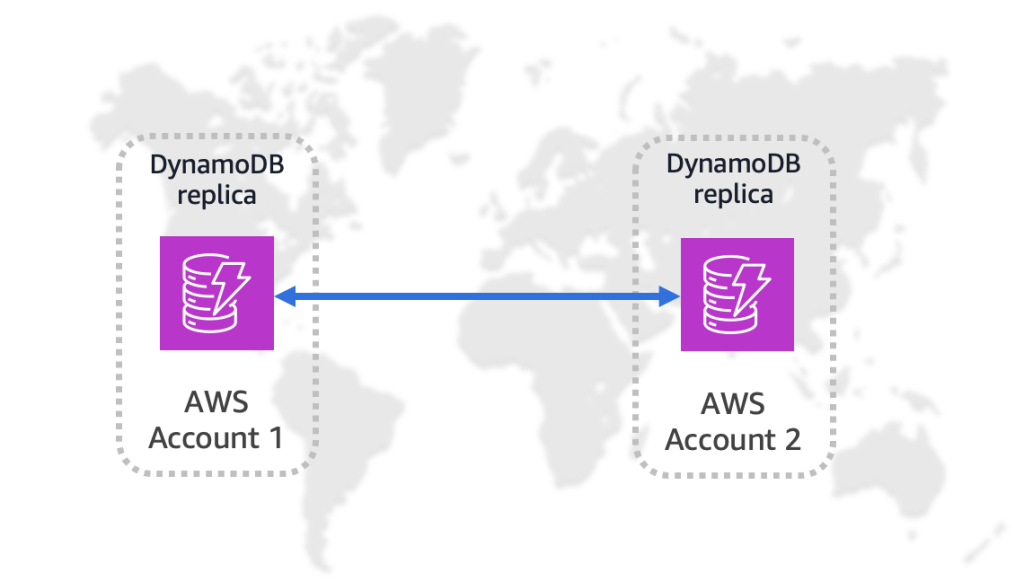
Amazon DynamoDB global tables now support replication across AWS accounts
Today, we’re announcing multi-account global tables for Amazon DynamoDB, which let you replicate DynamoDB table data across multiple AWS accounts and AWS Regions. This feature adds account-level isolation to global tables, so you can replicate DynamoDB table data across multiple AWS accounts and Regions for stronger isolation and resiliency. In this post, we show you how to create and configure a multi-account global table, and introduce use cases highlighting the value of using this feature.
Introducing pre-warming for Amazon Keyspaces tables
Amazon Keyspaces now supports the pre-warming feature to provide you with proactive throughput management. With pre-warming, you can set minimum warm throughput values that your table can handle instantly, avoiding the cold start delays that occur during dynamic partition splits. In this post, we discuss the Amazon Keyspaces pre-warming feature capabilities and demonstrate how it can enhance your throughput performance.

Create a SQL Server Developer Edition instance on Amazon RDS for SQL Server
In this post, we show you how to create and deploy SQL Server Developer Edition on Amazon RDS.

Configure additional storage volumes with Amazon RDS for SQL Server
With the introduction of the additional storage volume feature, you can now attach up to three additional storage volumes to your Amazon RDS for SQL Server instances. By using this feature, you can distribute your data and log files across multiple volumes. This enhancement offers more granular control over storage configuration and performance optimization. In this post, you will learn about the following scenarios: Adding a new storage volume, Scaling an existing storage volume, Restoring a database on an additional storage volume, and Deleting a storage volume.
Introducing Amazon Aurora powers for Kiro
In this post, we show how you can turn your ideas into full-stack applications with Kiro powers for Aurora. We explore how a new innovation, Kiro powers, can help you use Amazon Aurora best practices built into your development workflow, automatically implementing configurations and optimizations that make sure your database layer is production-ready from day one.
Exploring Optimize CPU feature on Amazon RDS for SQL Server
Amazon RDS for SQL Server now supports the Optimize CPU feature. With the Optimize CPU feature you can define the number of vCPUs when you launch new instances or when modifying existing database instances. This feature also provides a detailed billing breakdown of RDS infrastructure costs, and licensing costs for SQL Server and Windows OS. It is available starting from the 7th Generation instance class. In this post, we explore how to use the Optimize CPU feature with Amazon RDS for SQL Server.