AWS Compute Blog
Building Memory-Intensive Apps with AWS Lambda Managed Instances
Building memory-intensive applications with AWS Lambda just got easier. AWS Lambda Managed Instances gives you up to 32 GB of memory—3x more than standard AWS Lambda—while maintaining the serverless experience you know. Modern applications increasingly require substantial memory resources to process large datasets, perform complex analytics, and deliver real-time insights for use cases such as in-memory analytics, Machine Learning (ML) model inference, and real-time semantic search. AWS Lambda Managed Instances gives you a familiar serverless programming model and experience combined with the flexibility of being able to choose the underlying Amazon EC2 instance types and providing developers with access to large memory configurations.
In this post, you will see how AWS Lambda Managed Instances enables memory-intensive workloads that were previously challenging to run in serverless environments, using an AI-powered customer analytics application as a practical example. You’ll see cost savings of up to 33% compared to standard Lambda for predictable workloads, while eliminating the operational overhead of managing EC2 instances.
Understanding AWS Lambda Managed Instances
AWS Lambda Managed Instances runs your AWS Lambda functions on the Amazon EC2 instance types of your choice in your account, including Graviton4 and memory-optimized instance types. AWS handles underlying infrastructure lifecycle including provisioning, scaling, patching, and routing, while you benefit from Amazon EC2 pricing advantages like Savings Plans and Reserved Instances.
Key benefits include:
- Flexible instance selection: Choose from compute-optimized (C), general-purpose (M), and memory-optimized (R) instance families
- Configurable memory-CPU ratios: Optimize resource allocation for your workload
- Multi-concurrent invocations: One execution environment handles multiple invocations simultaneously, improving utilization for I/O-heavy applications
- Dynamic scaling: Instances scale based on CPU utilization without cold starts
AWS Lambda Managed Instances is best suited for high-volume, predictable workloads that benefit from sustained compute capacity and larger memory configurations.
Memory-Intensive Workloads Work Best with AWS Lambda Managed Instances
This blog focuses on one of AWS Lambda Managed Instances’ most powerful capabilities: running memory-intensive workloads that require more than the standard AWS Lambda’s 10 GB memory and 250MB ZIP limits. Here are the use cases where AWS Lambda Managed Instances helps:
- In-Memory Analytics — Load gigabytes of structured data into memory at initialization and serve sub-millisecond analytical queries across thousands of invocations
- ML Model Inference — Keep large model weights resident in memory across invocations for consistent, low-latency inference without a dedicated endpoint.
- Real-Time Semantic Search — Build vector similarity search over large embedding indexes held entirely in memory, enabling natural language queries over millions of records without an external vector database.
- Graph Processing — Hold large graph structures in memory for traversal algorithms that require the full graph to be accessible at once.
- Scientific & Numerical Computing — Run simulations, Monte Carlo methods, and large matrix operations that require substantial working memory and benefit from memory-optimized Amazon EC2 instance families.
- Large-Scale Report Generation — Aggregate and transform multi-gigabyte datasets in memory to generate complex reports or dashboards on demand, without staging data through intermediate storage.
Use Case: AI-Powered Customer Analytics with AWS Lambda Managed Instances
To demonstrate the power of AWS Lambda Managed Instances for memory-intensive applications, we built an AI-Powered Customer Analytics application that combines in-memory data processing with ML-based semantic search. The application loads in memory 1 million customer behavioral records (sessions, purchases, browsing patterns) from a Parquet file in S3 into a Pandas DataFrame and an embeddings cache consuming 200MB, then responds for analytics queries:
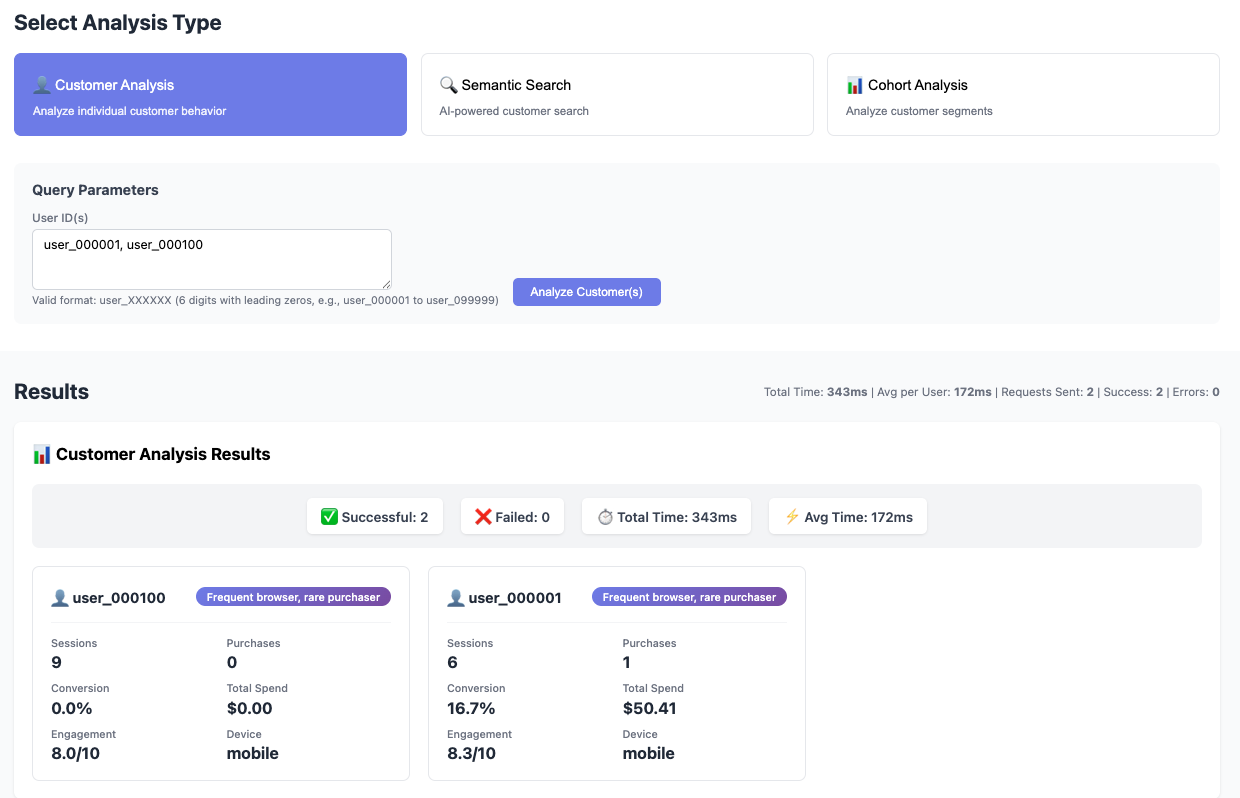
- Customer Analysis — Deep-dive into individual customer behavior: engagement scores, conversion rates, purchase patterns, and AI-generated customer segments
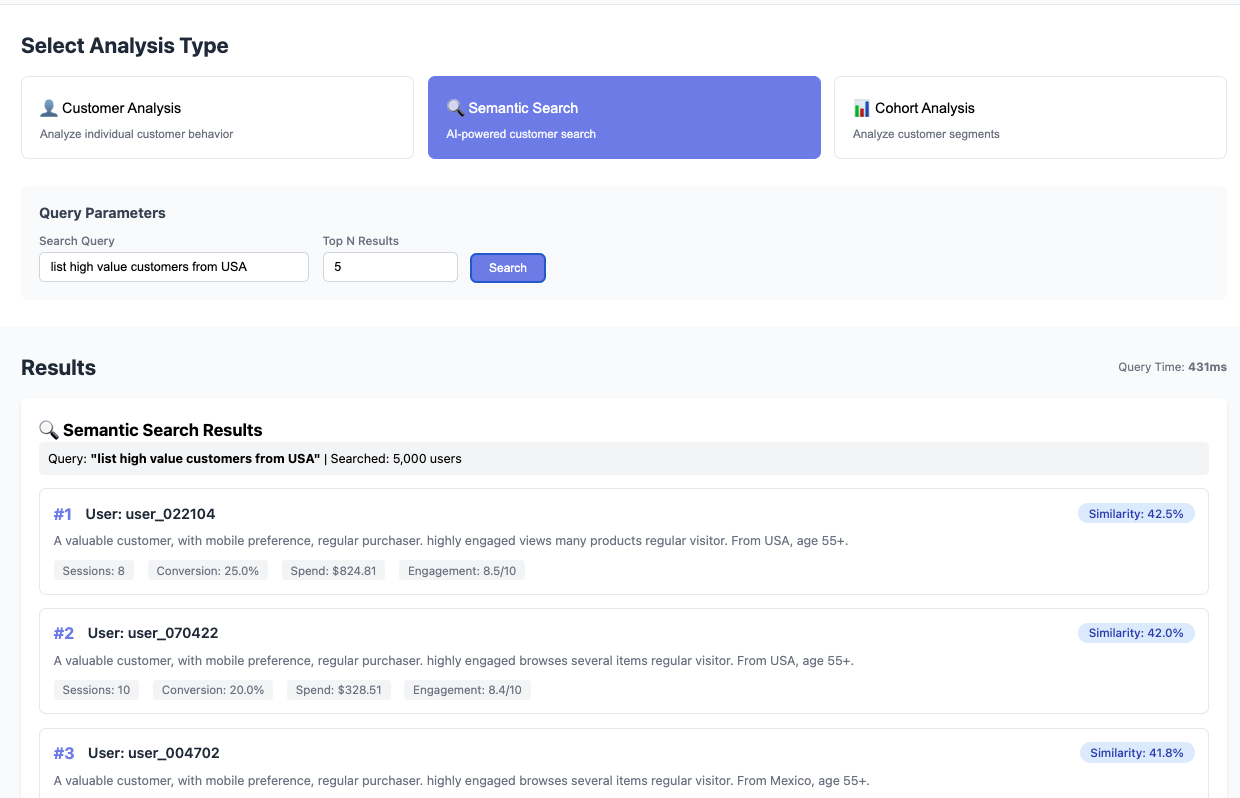
- Semantic Search — Natural language queries powered by FastEmbed (sentence-transformers/all-MiniLM-L6-v2) that find similar customers using vector similarity
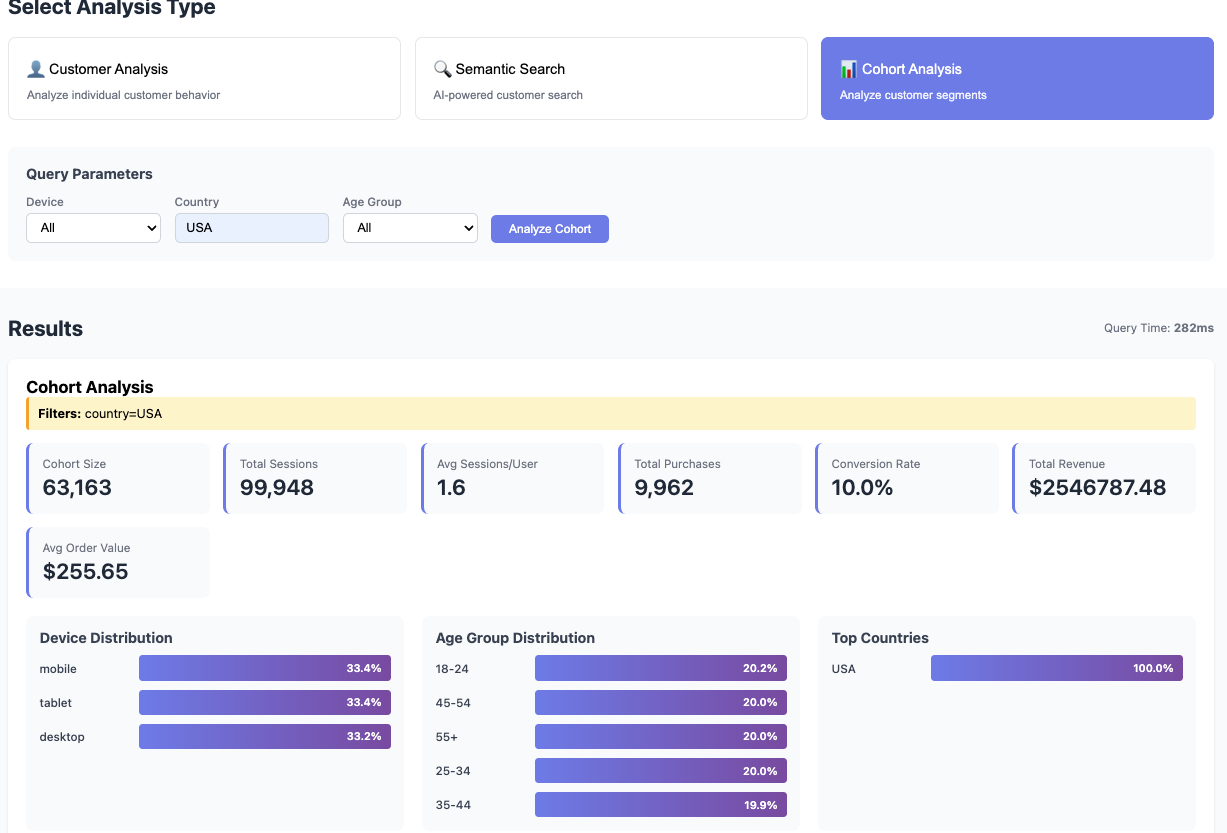
- Cohort Analysis — Real-time segmentation by device, country, age group with aggregated metrics
Architecture Overview
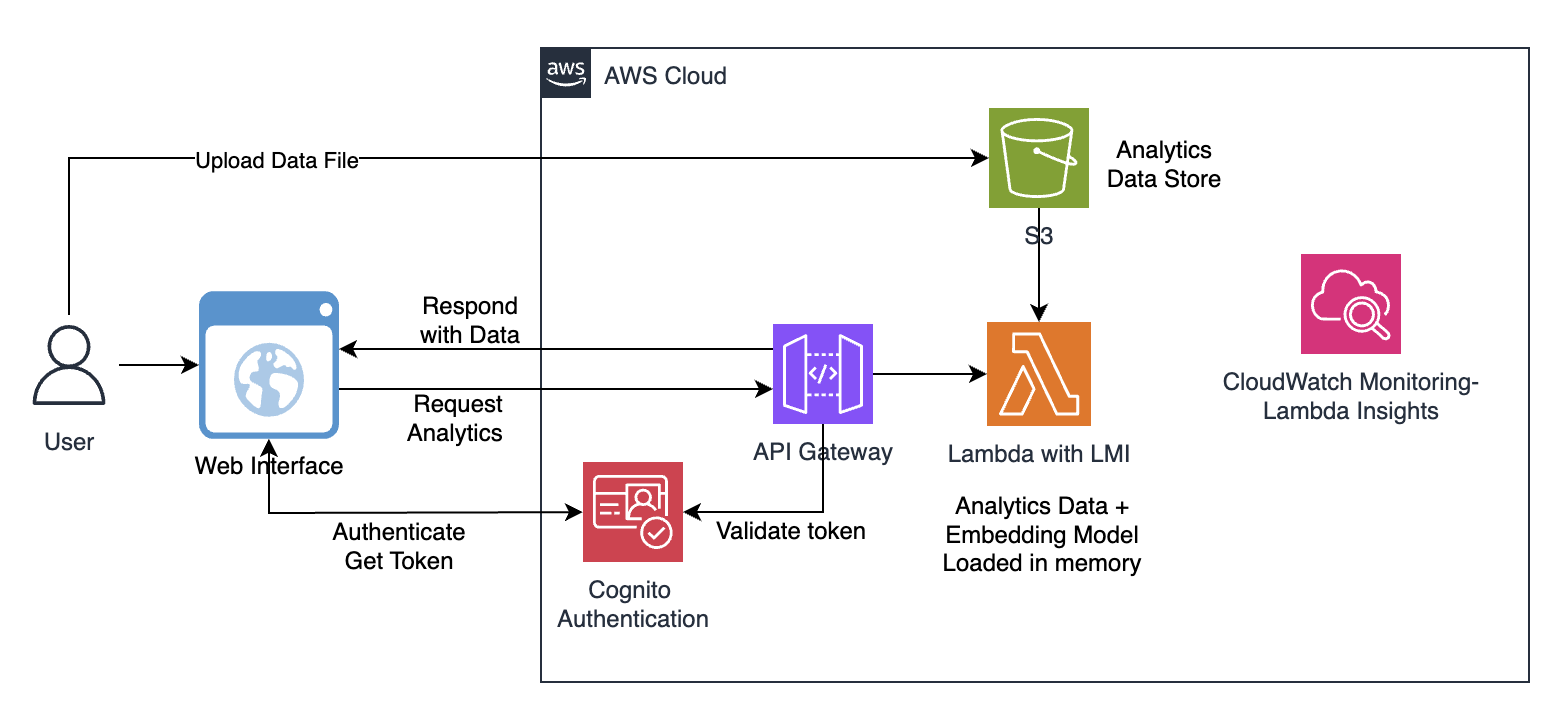
Our AI-powered customer analytics application demonstrates this in practice: 1 million records in memory (200MB), a compact sentence transformer model for semantic search, sub-second query performance, and zero infrastructure to manage. The solution uses a simple, serverless architecture:
- Customer transaction data (Parquet format) is stored in Amazon S3
- Amazon Cognito User Pool authenticates users and issues JWT tokens for API access
- Amazon API Gateway routes requests with Cognito authorizer validation, rate limiting (5 requests/second, burst 10), X-Ray tracing, and access logging
- AWS Lambda function with AWS Lambda Managed Instances loads the entire dataset (200MB) and all-MiniLM-L6-v2 model (900MB) into memory during initialization while also performing a threaded embeddings cache generation. This step can consume about 14GB of the allocated memory, exceeding standard AWS Lambda’s 10 GB limit
- Analytics queries execute against the in-memory data using the model
- Results are returned in milliseconds for interactive analysis
Deploy the Application
The below steps walk you through deploying the application to AWS using the AWS Serverless Application Model (SAM). The deployment process packages your Lambda function code, uploads artifacts to Amazon S3, and provisions all required AWS resources including Lambda functions, IAM roles, and any configured VPC networking via AWS CloudFormation.
Prerequisites
Make sure you have the following tools installed locally:
- AWS CLI configured with credentials
- SAM CLI installed
- Python 3.13+ installed locally
- Docker or Finch (required for container builds)
- AWS account with appropriate permissions
- A VPC with at least 2 subnets (across different Availability Zones) and a security group — required for the Lambda Managed Instances capacity provider
- Supported regions: Check AWS Capabilities by Region for supported regions
Getting Started
The complete source code for this application is available in our GitHub repository. To deploy it yourself follow the below steps and refer to the full deployment instructions hosted on GitHub.
1. Clone the repository
git clone https://github.com/aws-samples/sample-lambda-managed-instances-analytics.git
2. Navigate to the project folder
cd sample-lambda-managed-instances-analytics
chmod +x setup-data.sh deploy-lambda.sh
3. Generate sample data and upload to S3
./setup-data.sh
This script will create an S3 bucket (if needed), generate 1M rows of sample data, and upload the data to S3.
4. Build and deploy the Lambda function
./deploy-lambda.sh
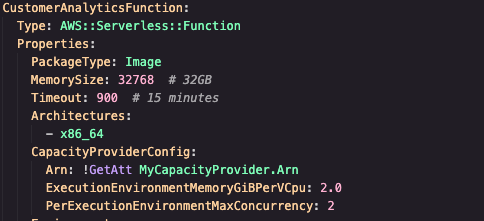
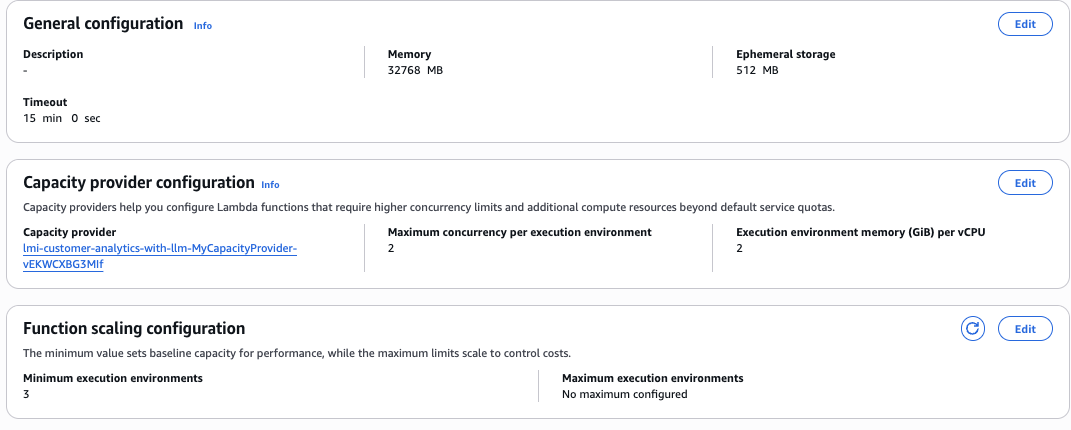
This script will build the container image with FastEmbed, push it to ECR, and deploy the Lambda function along with Capacity Provider, API Gateway, and Cognito User Pool. After deployment, it automatically generates the UI authentication configuration and prompts you to create a test user.
Run the Application
1. Start the UI
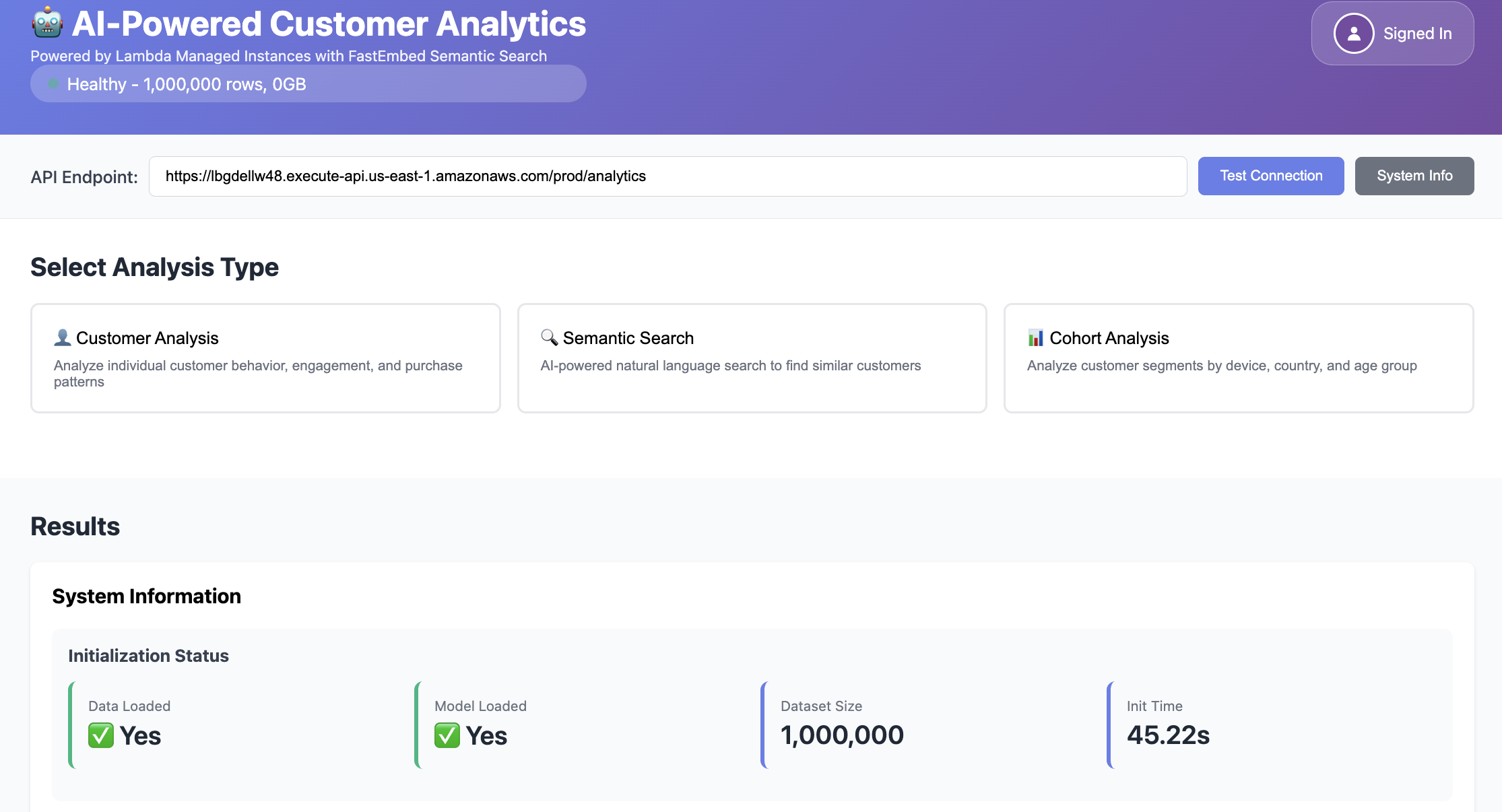
The application includes a simple HTML-based UI through which you can test the AWS Lambda function using Amazon API Gateway:
cd ui && python3 -m http.server 8000
2. Open your browser at http://localhost:8000 and click ‘Sign In’ to authenticate via Cognito using the username/password that you created during deployment

3. Enter your API endpoint URL. Test connection and click system Info.
Test the Application
a. Customer Analysis — Enter one or more User IDs to get more information on the customer behavior: engagement scores, conversion rates, purchase patterns, and AI-generated customer segments
b. Semantic Search – Enter natural language queries like “list high value customers from USA” in the Semantic Search and verify the results. Note that the response is very fast as the analytics data and FastEmbed models are loaded into memory during init stage
c. Cohort Analysis — Enter the query data to get Real-time segmentation by device, country, age group with aggregated metrics
Observability
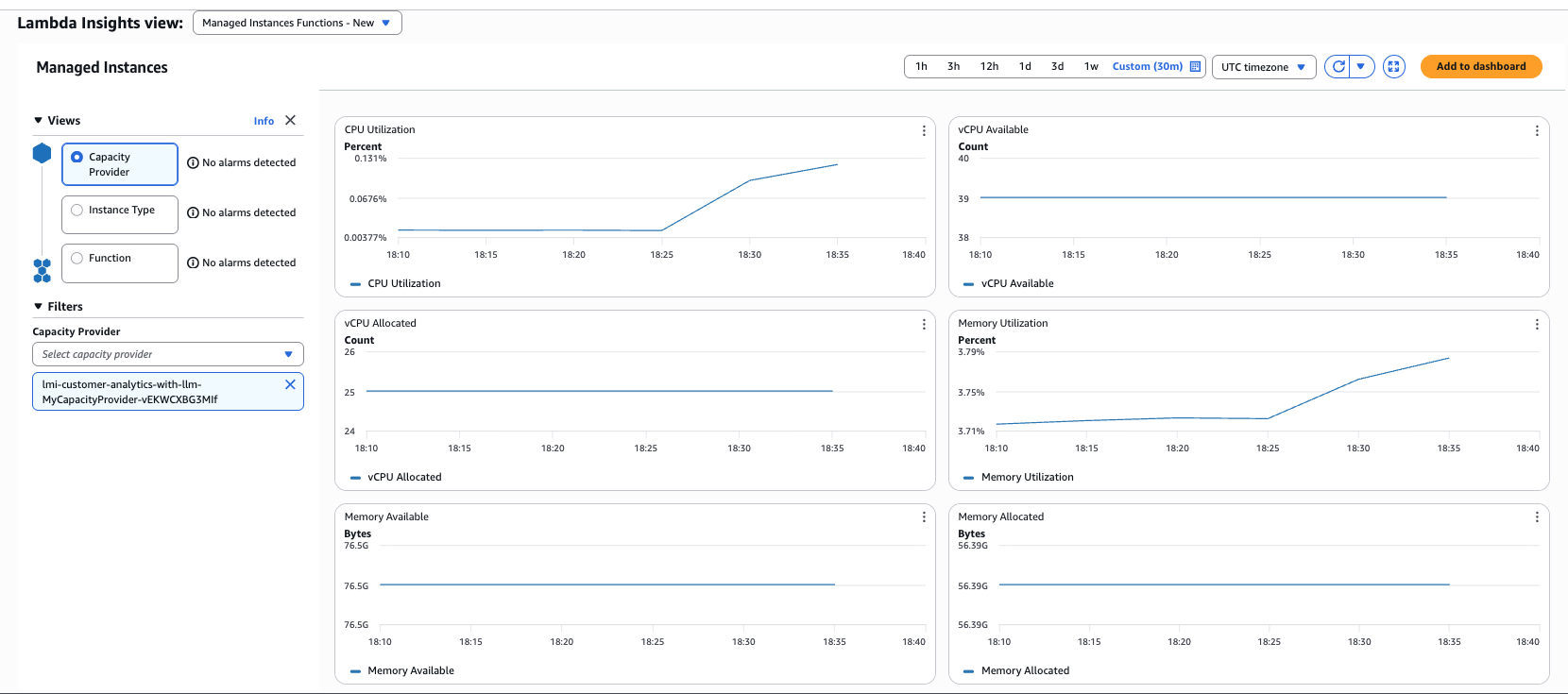
AWS Lambda Managed Instances automatically publishes metrics to Amazon CloudWatch, giving you visibility into function performance and capacity utilization. Monitor InitDuration to track dataset and model load time at startup, MaxMemoryUsed to confirm your data fits within configured memory, and ProvisionedConcurrencySpilloverInvocations to detect when AWS Lambda Managed Instances capacity is exhausted.
Enable AWS Lambda Insights for enhanced per-invocation metrics including CPU time and memory utilization over time. Use Amazon CloudWatch Log Insights to query INIT_START, INIT_END, and REPORT log entries for initialization and memory details per invocation.
What Makes This Better with AWS Lambda Managed Instances
Without AWS Lambda Managed Instances, building this same application would require one of these alternatives:
- Option A: EC2 with auto-scaling — Full control, full responsibility: patching, scaling policies, load balancing, and deployment pipelines — all on you.
- Option B: Redesign for standard Lambda — Swap in-memory data for an external database and replace the ML model with Amazon SageMaker endpoint. More latency, more cost, more complexity.
With AWS Lambda Managed Instances, you write a single AWS Lambda function, define a Capacity Provider, and deploy with SAM. AWS Lambda handles the Amazon EC2 instances, scaling, and lifecycle, giving you the memory you need with the operational simplicity you want. The in-memory approach eliminates network latency and disk I/O, delivering consistent sub-200ms response times for complex analytics.
Cost Considerations
AWS Lambda Managed Instances uses Amazon EC2-based pricing with a management fee. For predictable workloads, you can leverage Amazon EC2 Savings Plans or Reserved Instances to reduce costs significantly.
Example cost comparison (us-east-1, 32 GB memory, 1M invocations/month):
- AWS Lambda (standard): ~$267/month (on-demand pricing)
- AWS Lambda Managed Instances: ~$180/month (with 1-year Compute Savings Plan)
- Savings: 33% reduction
The cost benefits increase with higher memory configurations and sustained workloads that can take advantage of Amazon EC2 pricing discounts.
Best Practices
Based on experience building this solution, here are key recommendations:
- Memory sizing: Start with your dataset size plus 50% overhead for processing. Monitor Amazon CloudWatch metrics to optimize.
- Initialization strategy: Load large datasets during the init phase to amortize the cost across multiple invocations.
- Concurrency configuration: Set PerExecutionEnvironmentMaxConcurrency based on your workload’s I/O characteristics. Higher values work well for I/O-bound analytics.
- Data format: Use columnar formats like Parquet for efficient memory usage and fast loading.
- Monitoring: Track initialization duration, memory utilization, and invocation latency in Amazon CloudWatch to identify optimization opportunities.
Cleanup
When you’re done exploring the solution, it’s good practice to remove all provisioned resources to avoid ongoing charges. For the full cleanup commands and exact steps, refer to the project’s README.md in GitHub repository.
Conclusion
AWS Lambda Managed Instances opens up a new class of serverless applications that support larger AWS Lambda layer packages and more memory. Memory-intensive workloads — in-memory analytics, ML inference, graph processing, scientific computing — can now run with the simplicity of AWS Lambda and the resources of Amazon EC2. The customer analytics example demonstrates how in-memory processing with AWS Lambda Managed Instances delivers performance improvements over traditional database queries while maintaining serverless benefits like automatic scaling and pay-per-use pricing.
Ready to get started? Explore the AWS Lambda Managed Instances documentation and try building your own memory-intensive serverless application. You can find the complete code for this example on GitHub.